Inference Configuration
Work in progress
Letting users manipulate the inference parameters for text generation is currently a work in progress and expect changes to this system in the future.
If you wish to alter the inference parameters sent with the generation requests for text-generation you can do in the settings interface.

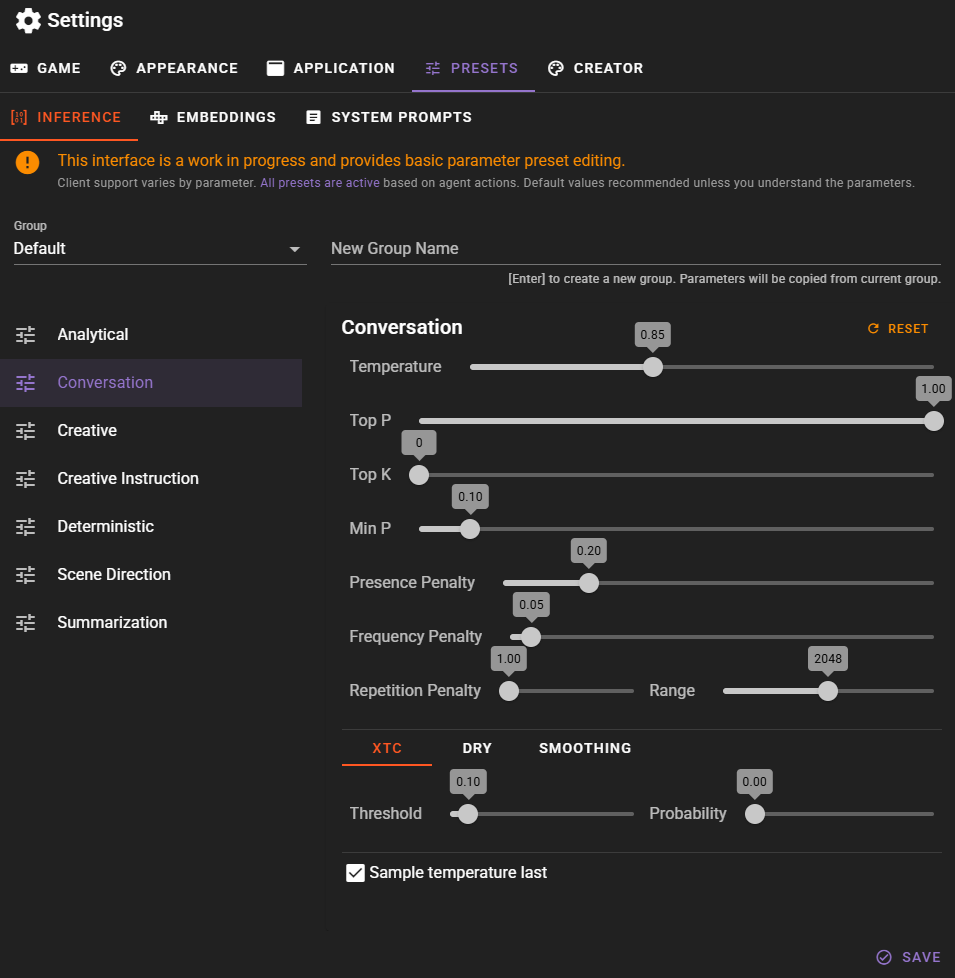
Navigate to the Presets tab then select the Inference tab.
Warning
Not all clients support all parameters, and generally it is assumed that the client implementation handles the parameters in a sane way, especially if values are passed for all of them. All presets are used and will be selected depending on the action the agent is performing. If you don't know what these mean, it is recommended to leave them as they are.
All presets are used
Its important to understand that all presets are used, depending on which action is performed by an agent.
Work in progress
This is currently transitioning to a better system. Main goal was to expose the parameters to the user, and make it somewhat understandable.
We've tried to categorize them in a sensible way, but there is probably still work that needs to be done in this area. A lot of them can probably be merged into a single category.
Categories
Analytical
Used when the agent is performing some kind of analysis, that requires accurate and truthful information.
Conversation
Used for generating actor responses in a conversation.
Creative
Used for content generation (Generating characters, details etc.) and narration.
Creative instruction
Similar to Creative but will be used when the agent is expected to follow the instruction very closely. This is one of the areas that needs more work and can probably be merged with one of the other categories.
Deterministic
Used when the agent is expected to follow the instruction very closely and we want to ensure that the output is deterministic.
Scene Direction
Used mostly for the director when directing the scene flow. Need to be creative but also follow the instruction closely.
Summarization
Used for summarizing the scene progress into narrative text.
Available Parameters
The inference preset editor provides access to the following generation parameters. Not all parameters are supported by all clients.
Basic Parameters
| Parameter | Range | Description |
|---|---|---|
| Temperature | 0.1 - 2.0 | Controls randomness in generation. Lower values produce more focused, deterministic output; higher values produce more varied, creative output. |
| Top-P | 0.1 - 1.0 | Nucleus sampling. Considers only the smallest set of tokens whose cumulative probability exceeds this value. |
| Top-K | 0 - 1024 | Limits sampling to the K most likely tokens. Set to 0 to disable. |
| Min-P | 0 - 1.0 | Filters out tokens with probability below this threshold relative to the most likely token. Helps prevent low-quality token choices. |
| Presence Penalty | 0 - 1.0 | Penalizes tokens that have already appeared in the generated text, encouraging discussion of new topics. |
| Frequency Penalty | 0 - 1.0 | Penalizes tokens based on how frequently they appear, reducing word repetition. |
| Repetition Penalty | 1.0 - 1.2 | Applies a multiplicative penalty to repeated tokens. |
| Repetition Penalty Range | 0 - 4096 | Number of tokens to look back when calculating repetition penalty. |
Advanced Parameters
These parameters are organized into tabs in the preset editor and provide finer control over sampling behavior.
XTC (Exclude Top Choices)
Removes the highest-probability tokens from consideration to encourage more creative, unexpected outputs.
| Parameter | Description |
|---|---|
| Threshold | Probability threshold above which tokens may be excluded. |
| Probability | Chance that qualifying tokens are actually excluded. |
DRY (Don't Repeat Yourself)
An advanced repetition penalty that specifically targets repeated sequences of tokens rather than individual tokens.
| Parameter | Description |
|---|---|
| Multiplier | Strength of the DRY penalty. Set to 0 to disable. |
| Base | Base value for the exponential penalty calculation. |
| Allowed Length | Minimum sequence length before DRY activates. |
| Sequence Breakers | Characters that reset the sequence tracking. |
Smoothing
Applies smoothing to the token probability distribution.
| Parameter | Description |
|---|---|
| Factor | Strength of the smoothing effect. Set to 0 to disable. |
| Curve | Controls the shape of the smoothing curve. |
Adaptive-P
Dynamically adjusts the sampling threshold based on the probability distribution of tokens.
| Parameter | Description |
|---|---|
| Target | Target entropy level. Negative values disable adaptive sampling. |
| Decay | Controls how quickly the adaptive threshold adjusts. |
Client Support
Different clients support different subsets of these parameters:
- KoboldCpp (United API): Supports all parameters listed above.
- KoboldCpp (OpenAI mode): Limited to temperature, top_p, presence_penalty, and max_tokens.
- Remote APIs (OpenAI, Anthropic, etc.): Typically support temperature, top_p, and penalty parameters. Advanced parameters like XTC, DRY, and Adaptive-P are generally not available.
- Other local APIs: Parameter support varies by implementation.
Preset Groups
Initially there is a Default group in which the presets are edited, but if you want you can create additional groups to create - for example - model / client specific presets.
To add a new group, type the title in to the New Group Name field in the upper right and press Enter.

The new group will be added and automatically selected for editing.

Once you have adjusted the presets to your liking you can save the group by clicking the Save button.
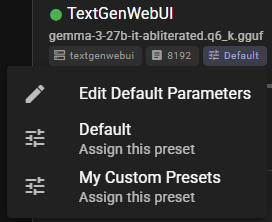
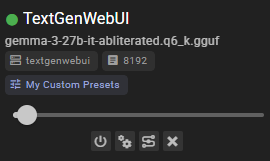
Setting the group for the client
In the client listing find the selected preset and click it to expand the meny containing the groups.