Pocket TTS
Pocket TTS is a local CPU-based text-to-speech model from Kyutai that supports voice cloning from audio files. Unlike other local TTS options that require a GPU, Pocket TTS runs efficiently on your CPU, making it accessible on a wider range of hardware.
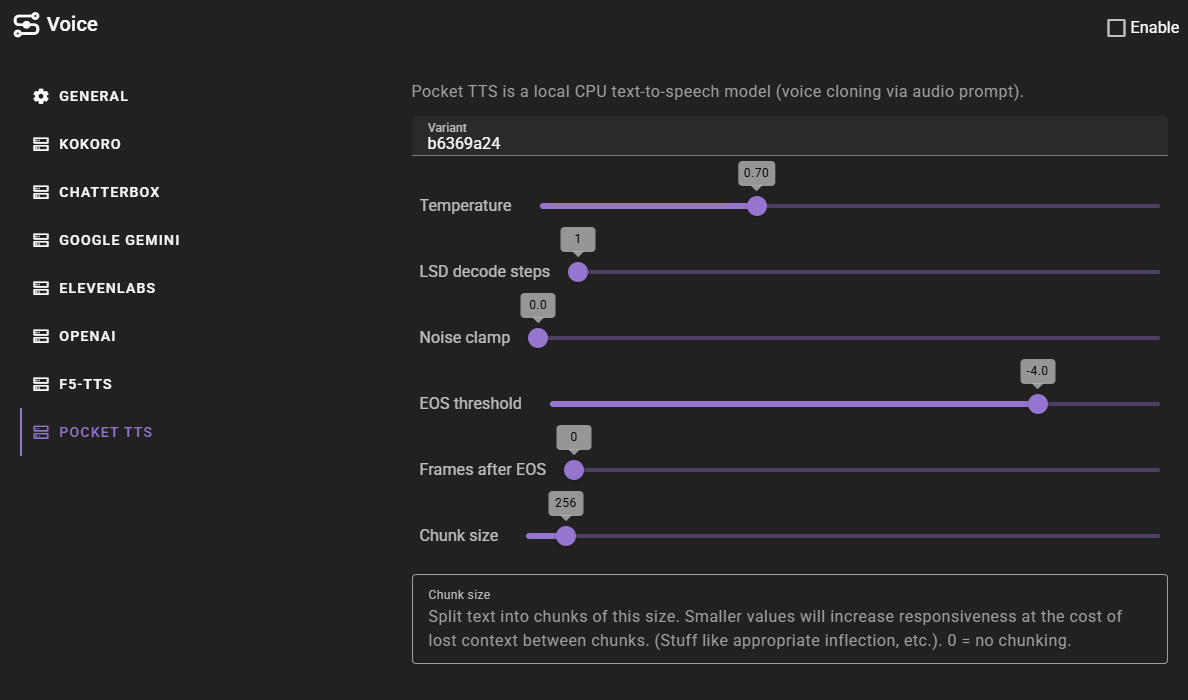
Key Features
- CPU-only - No GPU required, runs on standard computer hardware
- Voice cloning - Clone voices from short audio samples (.wav files)
- Low resource usage - Uses only 2 CPU cores with a small 100M parameter model
- Built-in voices - Includes several ready-to-use voice samples
- English only - Currently supports English language generation
First-Time Setup
The first time you generate audio with Pocket TTS, it will automatically download the model weights. This is a one-time download.
Voice Cloning Access
Voice cloning requires accepting the model terms on Hugging Face. If voice cloning downloads are blocked:
- Visit the Pocket TTS model page and accept the terms
- Create a Hugging Face access token
- Set the token in your environment as
HF_TOKEN - Restart Talemate
Configuration
Variant
The model variant identifier. The default b6369a24 is the current recommended version.
Temperature
Controls voice variation during generation. Higher values (e.g., 1.0) produce more varied but potentially less stable output. Lower values (e.g., 0.5) produce more consistent results. Default is 0.7.
LSD Decode Steps
Number of decoding steps. Higher values can improve quality but increase generation time. Default is 1.
Noise Clamp
When set above 0, limits noise sampling to prevent extreme values. 0 disables clamping. Default is 0.
EOS Threshold
End-of-sequence detection threshold. Controls when the model stops generating audio. Default is -4.0.
Frames After EOS
Number of additional audio frames to generate after detecting the end of speech. 0 uses automatic detection. Default is 0.
Chunk Size
Text is split into chunks of this size for processing. Smaller values increase responsiveness but may affect natural flow between chunks. 0 disables chunking. Default is 256.
Built-in Voices
Talemate includes several ready-to-use Pocket TTS voices. These are available immediately without any additional setup:
| Voice | Description |
|---|---|
| Eva | Female, calm, mature, thoughtful |
| Lisa | Female, energetic, young |
| Adam | Male, calm, mature, thoughtful, deep |
| Bradford | Male, calm, mature, thoughtful, deep |
| Julia | Female, calm, mature |
| Zoe | Female |
| William | Male, young |
These voices use audio samples located in the tts/voice/pocket_tts/ folder within your Talemate installation.
Adding Custom Voices
Voice Requirements
Pocket TTS voices use audio files as reference prompts for voice cloning:
- Audio file in .wav format
- Clear speech with minimal background noise
- Single speaker throughout the sample
Creating a Voice
- Open the Voice Library
- Click New
- Select "Pocket TTS" as the provider
- Configure the voice:
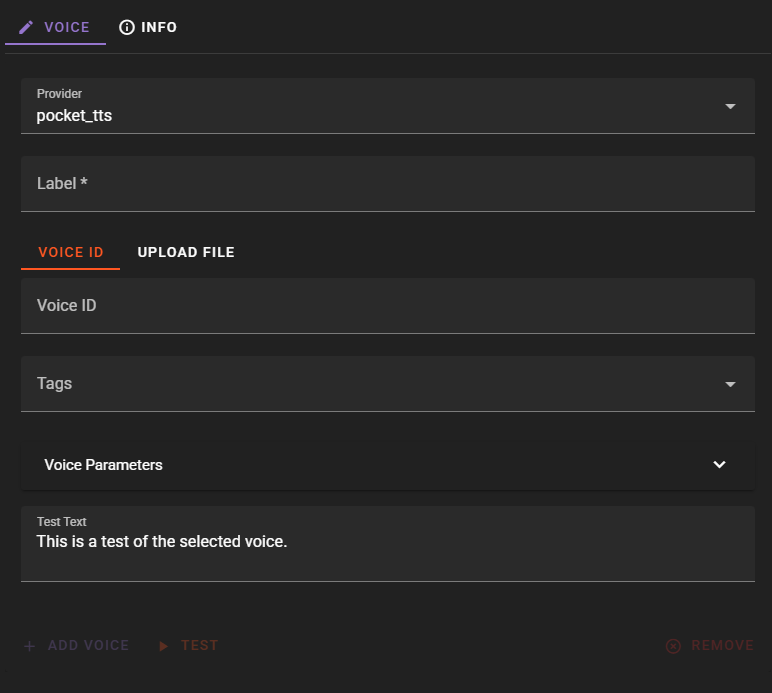
Label: A descriptive name for the voice (e.g., "Sarah - Warm Female")
Voice ID / Upload File: You have two options:
- Upload a .wav file containing the voice sample - the uploaded file becomes the voice ID
- Enter a path to a local .wav file (relative to Talemate workspace or absolute path)
- Enter a Hugging Face URL in the format
hf://kyutai/tts-voices/...
Tags: Add descriptive tags (gender, age, style) for organization and filtering
Extra Voice Parameters
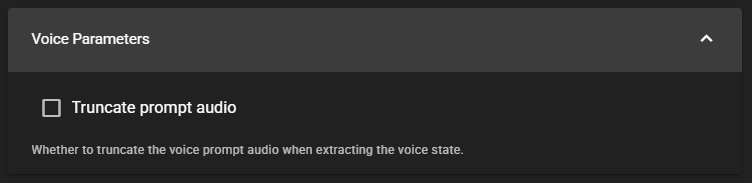
Truncate Prompt Audio
When enabled, truncates the voice prompt audio to 30 seconds when extracting the voice characteristics. This can help prevent memory issues with very long audio samples.
Using Hugging Face Voice Catalog
Kyutai provides a catalog of voices on Hugging Face that you can use directly with Pocket TTS. To use a voice from the catalog:
- Visit the Kyutai voice catalog
- Find a voice you want to use
- Copy the voice path
- In Talemate, create a new Pocket TTS voice and enter the path as the Voice ID in the format:
hf://kyutai/tts-voices/voice-name/file.wav
Troubleshooting
Model Download Issues
If the model fails to download:
- Check your internet connection
- Verify you have accepted the terms on Hugging Face
- Make sure your
HF_TOKENenvironment variable is set correctly - Try restarting Talemate
Voice Cloning Not Working
If you can use built-in voices but voice cloning fails:
- Voice cloning requires accepting additional terms on Hugging Face
- Follow the First-Time Setup instructions above to configure your Hugging Face token
Generation Quality Issues
If the generated audio sounds unusual:
- Try adjusting the Temperature setting - lower values produce more consistent results
- Ensure your voice reference audio is clear with minimal background noise
- Try using a shorter audio sample (5-15 seconds often works well)