llama.cpp Client
This requires you to have a llama.cpp server running
If you do not have a llama.cpp server running, you can follow the setup instructions in the llama.cpp GitHub repository.
The llama.cpp client connects to the llama-server executable from the llama.cpp project. This is an efficient, lightweight way to run local LLM inference.
If you want to add a llama.cpp client, change the Client Type to llama.cpp.
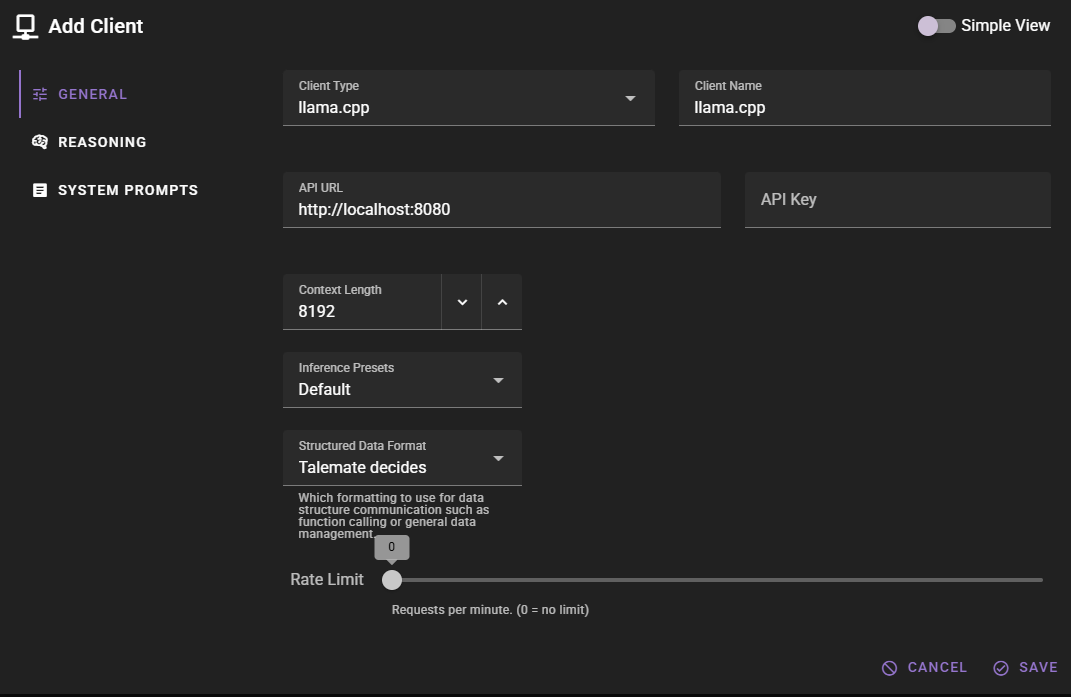
Should work out of the box with a local llama.cpp server
The default values should work with a local llama.cpp server if you are running llama-server on the default port (8080).
Click Save to add the client.
Ready to use
Once added, the client should appear in the clients list and display the currently loaded model.
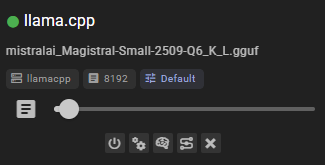
Settings
Client Name
A unique name for the client that makes sense to you.
API URL
The URL of your llama.cpp server, without any path. For example, http://localhost:8080.
The llama.cpp server (llama-server) defaults to port 8080, so unless you changed the port when starting the server, the default URL should work.
API Key
If your llama.cpp server is configured to require authentication, you can set the API key here. Most local setups do not require this.
Context Length
The number of tokens to use as context when generating text. Defaults to 8192.
Common issues
Generations are weird / bad
Make sure the correct prompt template is assigned. Talemate will attempt to automatically detect the appropriate prompt template based on the model name, but this does not always work.
Could not connect
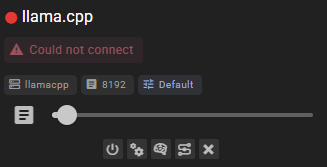
This means that either:
- Your llama.cpp server (
llama-server) is not running - The API URL is incorrect
- The connection is blocked (for example, by a firewall)
Make sure the server is running before attempting to connect. You can start the server with a command like:
llama-server -m /path/to/your/model.gguf
Response Length Enforcement
Controls whether token limits and/or human-readable response length instructions are sent with prompts. Defaults to Limit tokens and send instructions.
See Response Length Enforcement for details.