Settings
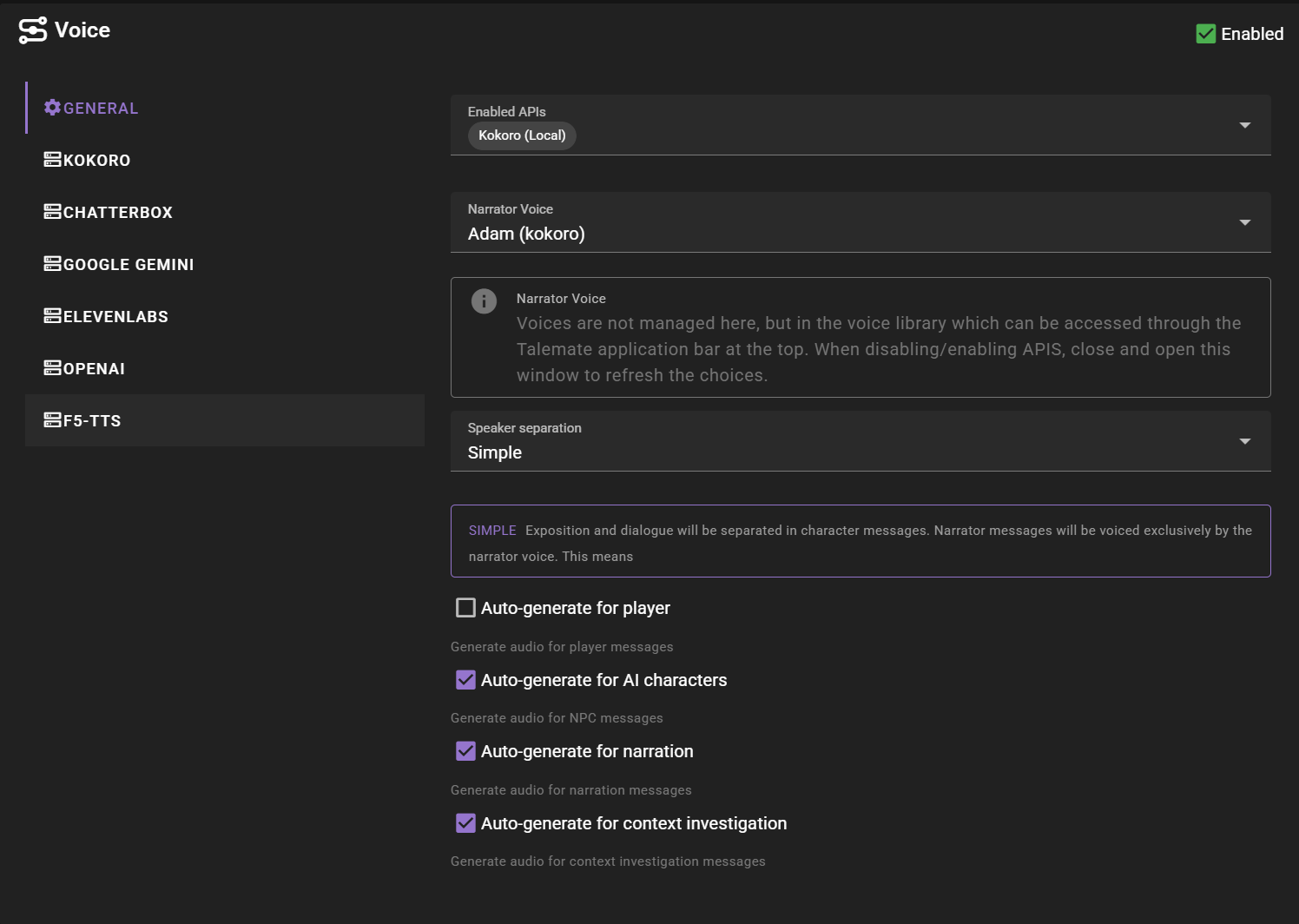
Enabled APIs
Select which TTS APIs to enable. You can enable multiple APIs simultaneously:
- Kokoro - Fastest generation with predefined voice models and mixing
- F5-TTS - Fast voice cloning with occasional mispronunciations
- Chatterbox - High-quality voice cloning (slower generation)
- Pocket TTS - CPU-based voice cloning from Kyutai (no GPU required)
- ElevenLabs - Professional voice synthesis with voice cloning
- Google Gemini-TTS - Google's text-to-speech service
- OpenAI - OpenAI's TTS-1 and TTS-1-HD models
- OpenAI Compatible - Any server exposing an OpenAI-style
/v1/audio/speechendpoint (vLLM, LocalAI, Speaches, etc.)
Multi-API Support
You can enable multiple APIs and assign different voices from different providers to different characters. The system will automatically route voice generation to the appropriate API based on the voice assignment.
Narrator Voice
The default voice used for narration and as a fallback for characters without assigned voices.
The dropdown shows all available voices from all enabled APIs, with the format: "Voice Name (Provider)"
Voice Management
Voices are managed through the Voice Library, accessible from the main application bar. Adding, removing, or modifying voices should be done through the Voice Library interface.
Speaker Separation
Controls how dialogue is separated from exposition in messages:
- No separation - Character messages use character voice entirely, narrator messages use narrator voice
- Simple - Basic separation of dialogue from exposition using punctuation analysis, with exposition being read by the narrator voice
- Mixed - Enables AI assisted separation for narrator messages and simple separation for character messages
- AI assisted - AI assisted separation for both narrator and character messages
AI Assisted Performance
AI-assisted speaker separation sends additional prompts to your LLM, which may impact response time and API costs.
Auto-generate for player
Generate voice automatically for player messages
Auto-generate for AI characters
Generate voice automatically for NPC/AI character messages
Auto-generate for narration
Generate voice automatically for narrator messages
Auto-generate for context investigation
Generate voice automatically for context investigation messages
Automatic Setup
New in 0.37.0
Default: on.
When enabled, the Voice agent automatically registers an OpenAI Compatible backend for any configured client that exposes a TTS endpoint, and keeps that backend's enabled state in sync with what the client currently has loaded.
The clearest example is KoboldCpp: when a KoboldCpp client has a TTS model loaded, a matching backend appears on the OpenAI Compatible tab without any manual configuration. When the client restarts without a TTS model, the backend is dropped from Enabled APIs but its settings are preserved.
Turning this off stops the agent from auto-registering or auto-toggling any backends. Existing backends — auto-managed or not — stay where they are; you take over enabling and disabling them yourself.
Advanced Settings
Advanced settings are configured per-API and can be found in the respective API configuration sections:
- Chunk size - Maximum text length per generation request
- Model selection - Choose specific models for each API
- Voice parameters - Provider-specific voice settings
Performance Optimization
Each API has different optimal chunk sizes and parameters. The system automatically handles chunking and queuing for optimal performance across all enabled APIs.