Settings
Open by clicking the Creator agent in the agent list.

Character Creation
These settings control how AI-assisted character creation generates characters —
this applies everywhere characters are created with AI assistance: the world
editor, the scene tools character introduction and character card import.
The Generate Character node follows these settings as well.
Fast Character Generation
When enabled, character generation is consolidated into a single prompt instead of one prompt per aspect. This is much faster (one request instead of several), but note that less detail in the individual aspects is a possible failure mode of this approach, and the model needs a large context window and reliable structured output. Turn this off for older or smaller models.
On by default. Can also be flipped quickly via the quick-toggle chip.
When the scene has a writing style template configured, the consolidated prompt applies it.
Consolidate
Visible when Fast Character Generation is enabled. Selects which aspects the consolidated prompt generates: Name, Description, Attributes, Dialogue instructions and/or Example dialogue. Aspects not selected are still generated with their individual prompts.
The additional Attribute templates entry folds attribute world-state
templates selected during character creation into the consolidated prompt as
per-attribute instructions, instead of running one prompt per template. It
requires Attributes to be selected as well — otherwise the templates apply
per-template as before. {character_name} placeholders in the template text
are formatted with the character's name, or "the character" while the name
is still being determined.
Defaults to everything (all aspects and Attribute templates).
Note that when the one-shot produces the example dialogue itself, the
agent.creator.dialogue_examples node-graph events are not emitted (they
fire on the split flow and on fill-in-misses regeneration only).
One-shot token budget
Visible when Fast Character Generation is enabled. The maximum response tokens for the consolidated prompt (1024–8192, default 4096). All consolidated aspects share this budget — if the response is truncated, later sections come out missing and are regenerated individually when Fill in misses is on.
Fill in misses
Visible when Fast Character Generation is enabled. When the consolidated response misses an aspect entirely, that aspect's individual request is run to fill it in. When disabled, missed aspects are left empty.
A completely unparseable consolidated response is always a hard error, regardless of this setting.
On by default.
Long Term Memory
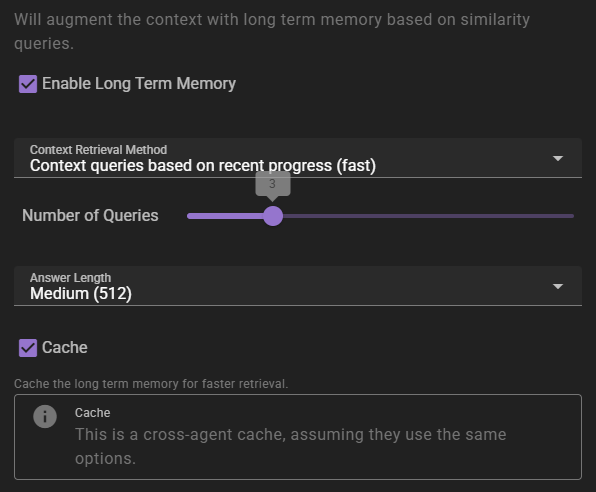
If enabled will inject relevant information into the context using relevancy through the Memory Agent.
Context Retrieval Method
What method to use for long term memory selection
Context queries based on recent context- will take the last 3 messages in the scene and select relevant context from them. This is the fastest method, but may not always be the most relevant.Context queries generated by AI- will generate a set of context queries based on the current scene and select relevant context from them. This is slower, but may be more relevant.AI compiled questions and answers- will use the AI to generate a set of questions and answers based on the current scene and select relevant context from them. This is the slowest, and not necessarily better than the other methods.
Number of queries
Only shown for the two AI-assisted retrieval methods. It means different things depending on the method.
- For
Context queries generated by AIthis is the number of queries to generate. - For
AI compiled questions and answersthis is the number of questions to generate.
The default is 5. None (Semantic similarity only) does not use it.
Answer length
The maximum response length of the generated answers.
Cache
Enables the agent-wide cache of long term memory retrieval. Agents that share the same long term memory settings share the cache. AI-assisted retrieval publishes a cached result; character-scoped retrieval in Character perspectives mode can also cache semantic-only results. Standard semantic-only retrieval remains uncached.
Regenerating a reply reuses a published result only when the story before that reply, the memory sources available to the retrieval, and its settings are unchanged. New or edited world entries, character details and archives refresh affected cached results, as do relevant knowledge visibility and memory-collection changes. When retrieval is limited to character knowledge, access rules tied to the reply being regenerated do not count as earlier sources. Without that limit, access rules do not affect retrieval. Changes to older retained access rules still refresh affected results. A retrieval already in progress can finish with its earlier context. A result built before one of those inputs changed is not reused after the change.
Autocomplete
These settings control the Autocomplete feature.
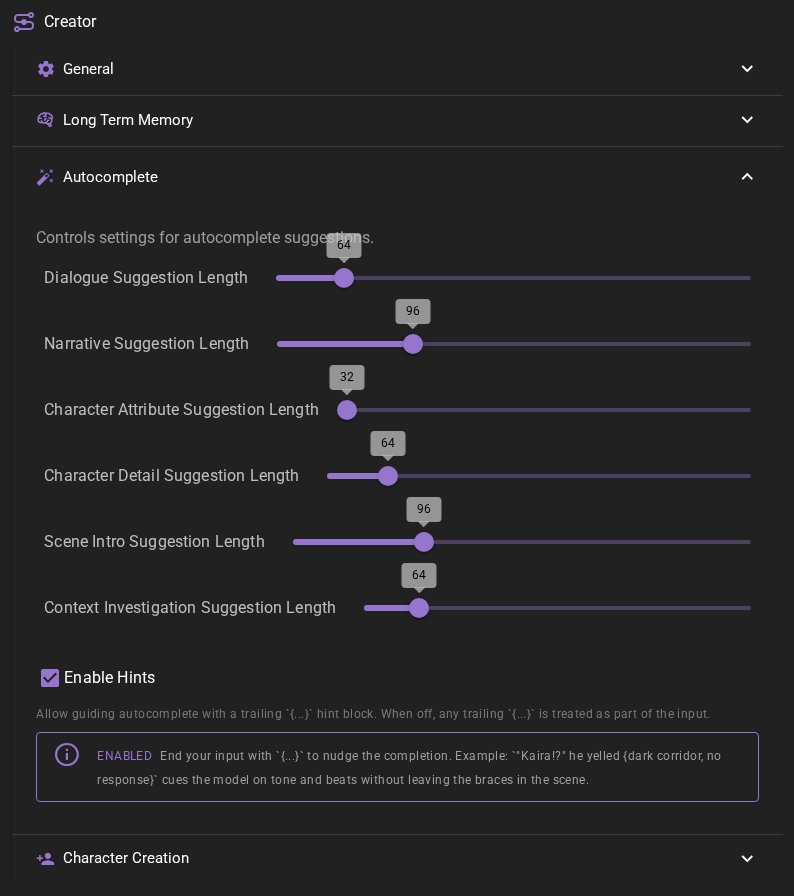
Dialogue Suggestion Length
How many tokens to generate (max.) when autocompleting character actions.
Narrative Suggestion Length
How many tokens to generate (max.) when autocompleting narrative text.
Character Attribute Suggestion Length
How many tokens to generate (max.) when autocompleting a character attribute field.
Character Detail Suggestion Length
How many tokens to generate (max.) when autocompleting a character detail or description field.
Scene Intro Suggestion Length
How many tokens to generate (max.) when autocompleting the scene intro field.
Context Investigation Suggestion Length
How many tokens to generate (max.) when autocompleting a context-investigation message.
Enable Hints
When enabled (the default), a trailing {...} block at the end of your input is treated as a hint that steers the continuation, and is stripped from the field once the suggestion is accepted.
When disabled, any trailing {...} is treated as ordinary text and sent as part of your input.
See Steering the continuation with hints for details.