OpenAI Compatible Client
Allows you to use Talemate with a service that exposes an openai-like API.
Use the officual client if it is available
Only use this if the service you are trying access doen't already have official support from Talemate. All the officially supported clients can be found here.
DeepInfra
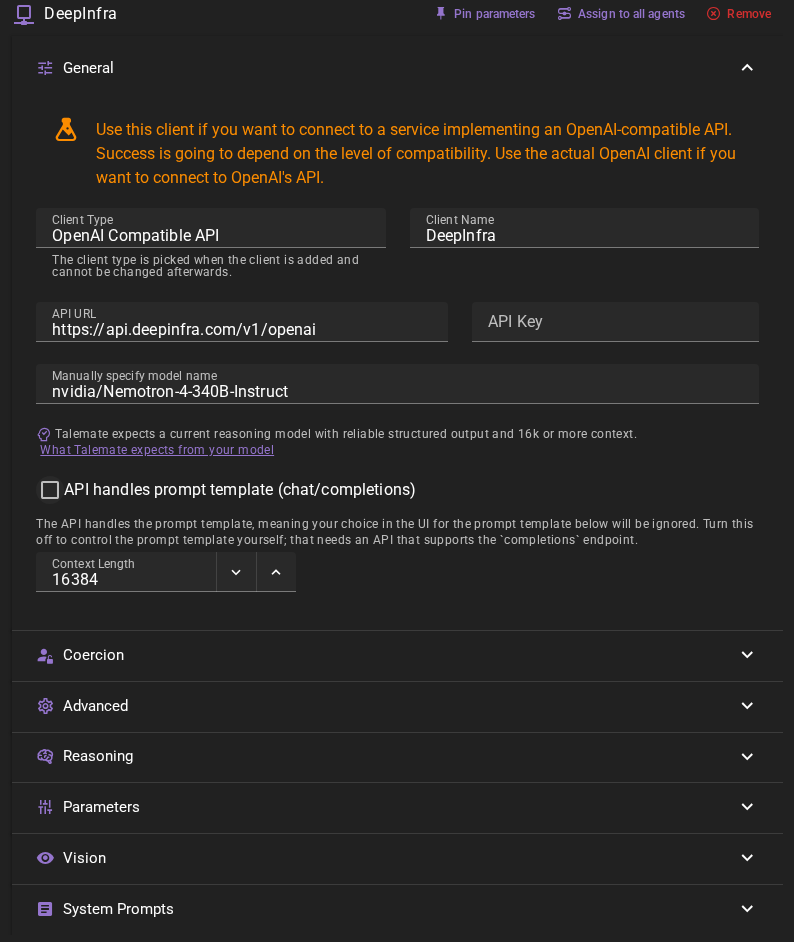
If you want to add a DeepInfra client, go to Settings → Connections → Clients, click Add client and pick OpenAI Compatible API from the client type menu.
Settings
Client Name
A unique name for the client that makes sense to you.
API Url
The URL of DeepInfra's openai api - currently https://api.deepinfra.com/v1/openai
API Key
Your DeepInfra api key. You can manage your DeepInfra API keys at https://deepinfra.com/dash/api_keys
API handles prompt template
With this on, requests go to the chat/completions API and DeepInfra is in control of the prompt template. DeepInfra then needs to be configured correctly, and Talemate loses control of the prompt template, which likely costs quality, so it is recommended to turn it off for DeepInfra. New clients start with this on, because chat completions work with every server that has a chat endpoint; a client you saved before keeps its saved setting. Turning the checkbox off shows the Prompt Template picker in the editor right away, so you can choose the template in the same edit, before you save.
Model name
Currently you need to manually specify which model to use by typing its name as it exists on deepinfra.com.
Decent choices:
microsoft/WizardLM-2-8x22B
nvidia/Nemotron-4-340B-Instruct
meta-llama/Meta-Llama-3-70B-Instruct
mistralai/Mixtral-8x22B-Instruct-v0.1
Context Length
The number of tokens to use as context when generating text. Defaults to 16384.
Parameters
The Parameters section of the client editor lets you control which sampler parameters are sent with each request. Some OpenAI-compatible services reject requests that include parameters they don't support for the selected model, returning an error instead of a generation. If you run into this, you can turn the offending parameter off so it is left out of the request entirely.
Each parameter has its own toggle:
- Send temperature
- Send top_p
- Send presence_penalty
- Send stop: the stop sequences, such as the other characters' names in a conversation, so the server stops before writing their lines.
All four are enabled for a new client. Turning a toggle off omits that parameter from the request completely (it is not sent as a zero value). Leave them enabled unless the service you are connecting to errors when it receives one of them. OpenAI itself accepts at most four stop sequences; turn Send stop off if a service rejects the list.
Clients saved before 0.40
Send stop and Send enable_thinking are new in 0.40. A client saved by an earlier version keeps sending the request it sent before: both start off. Turn them on in the client's settings to use them.
Streaming
Stream is on by default: the server sends the response as it is generated, so the tokens-per-second figure on the client card moves while it works. Until the first token arrives the card shows waiting…, which is normal while a long prompt is processed. Turn Stream off, under Parameters, if your server does not support streaming; the card then shows the speed once the whole response is in.
Reasoning
Enable Reasoning in the client editor for a reasoning model. Choose Reasoning Effort and the Reasoning Effort Format your server accepts:
| Format | What Talemate sends |
|---|---|
none (initial setting) |
No effort field; the server uses its own defaults. |
reasoning_effort |
A field such as "reasoning_effort": "high". |
reasoning |
An object such as "reasoning": {"effort": "high"}. |
The effort choices are default, none, minimal, low, medium, high, xhigh, and max. Pick a level supported by your server and model. Effort default omits the setting in every format. Effort none is different from format none: it sends a request for no reasoning when a sending format is selected, and only works on models that accept that level.
These settings apply to both chat completions (API handles prompt template enabled) and text completions (disabled). Support can differ between those endpoints, even on the same server. Check the server's documentation; Talemate does not infer support from its URL or model name, probe it, or retry a rejected request with a different format.
Completion Token Parameter, next to Reasoning Effort Format, chooses the field used for the total completion limit:
| Parameter | When to use it |
|---|---|
max_tokens (initial setting) |
Servers using the traditional completion limit, including most text-completion endpoints. Existing saved clients keep this choice. |
max_completion_tokens |
OpenAI chat completions and compatible servers that require this parameter. |
With API handles prompt template disabled, text completions carry a limit even when your response length setting sends no cap, because text-completion servers such as vLLM otherwise stop after 16 tokens. Talemate asks the server to count the prompt (vLLM and llama.cpp can, at /tokenize) and sends the room left in Context Length. If the counted prompt fills Context Length, the generation fails with an error such as "The prompt (2346 tokens) leaves no room for a response within the client's Context Length (2048)": raise Context Length if the server allows more, or choose a response length setting that caps tokens. For a server that cannot count, such as LM Studio or Ollama, Talemate estimates the prompt with some headroom; when the prompt is near Context Length, it sends no limit and the server's own default applies.
The choice applies whenever the response token cap is enabled, even with reasoning disabled. It changes only the field name, not the limit. For direct OpenAI at https://api.openai.com/v1, enable API handles prompt template, choose reasoning_effort and max_completion_tokens, turn off Send enable_thinking and Send stop (OpenAI rejects unknown request fields and more than four stop sequences), and disable any sampler parameters the selected model rejects. The dedicated OpenAI client needs none of this. OpenAI chat completions reject the reasoning object with HTTP 400; that format is for other servers that accept it.
Extra Completion Tokens retains your saved Reasoning Tokens value. It adds headroom to the selected total completion limit when reasoning and the response token cap are enabled, and remains available to prompt templates as reasoning_tokens. It does not send a separate thinking budget. Use Reasoning Effort to control depth instead. Choosing an effort or a completion token parameter does not change this allowance.
With API handles prompt template enabled, servers such as llama.cpp (llama-server --jinja) return the reasoning separately from the answer, and Talemate reads it from there, shows it with the prompt in the prompt viewer and ignores the strip pattern. If the server leaves the reasoning in the answer instead, Talemate strips it with your reasoning pattern; in this mode a response without a matching pattern is used as it is, unless you set a validation pattern or a reason prefill, which mean the reasoning started and make an unclosed block follow Pattern Not Found Behavior. Without API handles prompt template, Talemate looks for the reasoning in the response text and needs a pattern that matches your model.
Send enable_thinking (on for a new client) tells the server's chat template whether to think, following the Reasoning setting: with reasoning off, models with switchable thinking such as Qwen3 and Qwen3.5 answer directly instead of spending the response on thinking. It applies with API handles prompt template enabled and is understood by llama.cpp, vLLM and SGLang. Turn it off for a service that rejects unknown request fields.
When a sending format is selected, the client card shows the chosen effort in a dropdown, where you can change it quickly. With format none, it shows a field for the extra completion allowance instead. With Reasoning off, a Reasoning Disabled chip takes the place of the dropdown or the field. Turning Talemate reasoning off, globally or for an agent action, omits the effort setting and padding; the server may still reason according to its own defaults. Keep your existing reasoning patterns if your model includes thinking in its response text.
Vision
Open the Vision section of the client editor and turn on Enable Vision to let the client analyze images, for example for the Visualizer's Talemate Client image analysis backend. It is off for a new client, and while it is off nothing about the client changes.
Only turn it on when the model behind the endpoint accepts image input. Image analysis is always sent to /chat/completions, whatever API handles prompt template is set to, so the server needs that endpoint.
Ready to use
Click Save in the toolbar to add the client.
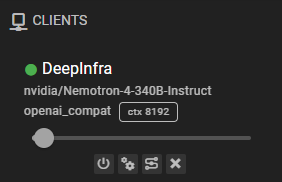
Once it is added, the client should appear in the clients list and should display the currently loaded model.
Common issues
Generations are weird / bad
Make sure the correct prompt template is assigned.
The error names a different problem than expected
When a request fails before the server answers, for example a refused connection or a rejected key, the error dialog shows the actual cause. A server that needs no key can be left with an empty API Key.
The error says an endpoint returned 404
The error names the request the server rejected, for example POST /v1/completions returned 404. The client sends text completions to /completions and, with API handles prompt template enabled, chat completions to /chat/completions, both under the API Url. Check three things:
- The API Url includes the version path the server expects. A server that serves
/v1/chat/completionsneeds a URL ending in/v1, such ashttp://localhost:8081/v1. The URL is used as you type it. - Some servers only provide chat completions. If
/completionsis the one that fails, enable API handles prompt template. - The Model is one the server serves. vLLM and Ollama also answer 404 for an unknown model, so enabling API handles prompt template does not help in that case.
Could not connect
The API URL field is empty. This client reports Could not connect when it has no URL to send requests to.
A URL that is present but wrong does not produce this error — this client takes the model name from the field you filled in rather than asking the service for it, so it keeps reporting as connected and the problem shows up as a failed generation instead.
Response Length Enforcement
Controls whether token limits and/or human-readable response length instructions are sent with prompts. Defaults to Limit tokens and send instructions.
See Response Length Enforcement for details.