OpenAI Compatible (Vision)
The OpenAI Compatible backend for image analysis allows you to connect to any API endpoint that implements the OpenAI chat completions format with multimodal vision support. This includes local inference servers like llama.cpp, Ollama, vLLM, and other OpenAI-compatible services running vision-capable models.
Prerequisites
- An OpenAI-compatible API endpoint that supports multimodal vision input
- A vision-capable model loaded on the endpoint
Setup
- Open the Visualizer agent settings
- Set the Backend (image analysis) dropdown to OpenAI Compatible
- Configure the backend settings that appear below
Configuration
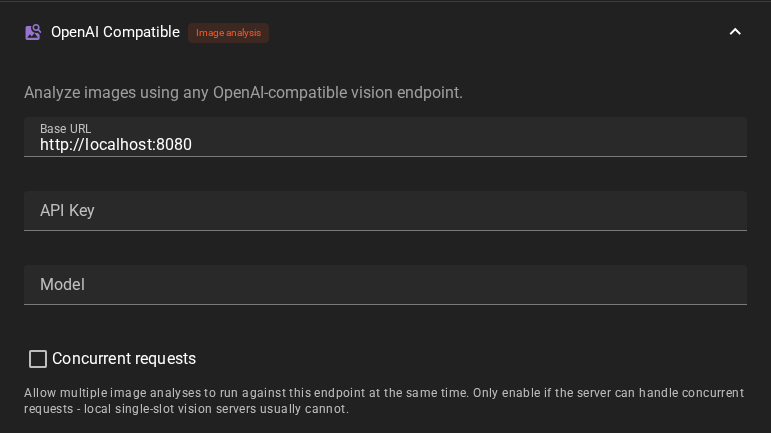
Base URL
The base URL of your OpenAI-compatible API endpoint. For example:
http://localhost:8080(llama.cpp)http://localhost:8000(vLLM)
The /v1 path is appended automatically if not already present.
API Key
Optional API key for authentication. Leave empty if your endpoint does not require authentication. A placeholder value is used automatically when no key is provided.
Model
The model name to use for vision analysis. This may be optional depending on the API endpoint -- some single-model servers do not require it, while multi-model servers need it to route requests correctly.
Concurrent requests
Allows batch image analysis (for example the Analyze Images node) to send multiple requests to this endpoint at the same time. Off by default -- only enable it if the endpoint genuinely serves concurrent requests. Local single-slot vision servers usually do not; they queue the extra requests at best, and with the toggle off Talemate analyzes one image at a time instead.
Usage
Once configured, the backend is used automatically whenever image analysis is requested through the Visualizer agent. This includes:
- Analyzing images in the Visual Library
- Automatic analysis of reference images during prompt generation (when enabled)
- Any other feature that requires image understanding
Troubleshooting
Connection errors: Verify that the base URL is correct and the server is running. The backend tests the connection by attempting to list available models.
Empty or missing responses: Ensure the model loaded on your endpoint actually supports multimodal vision input. Not all models support image analysis even if they run on a vision-capable server.
Model not found: If using a multi-model server, verify that the model name matches exactly what the server expects (check the server's model list).