OpenAI Compatible
Updated in 0.37.0
The OpenAI Compatible tab is now a registry — add as many backends as you need, each with its own URL, key, model, and voice list. Voices are auto-fetched when the server supports it.
Use this backend to connect Talemate to any TTS service that implements the OpenAI speech API format. Each registered backend talks to one server, has its own settings, and contributes its own voices to the global voice library.
You can register multiple backends side by side — for example a local server and a hosted one, or two local servers running different models — and pick which ones are active from the Enabled APIs list.
The OpenAI Compatible tab
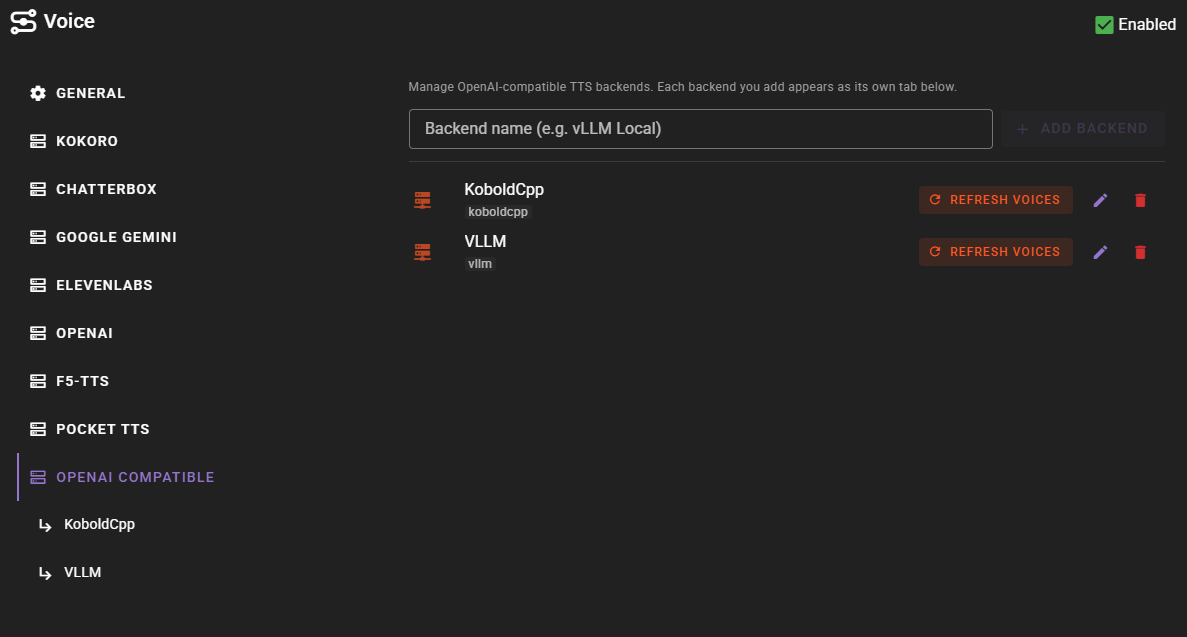
Open the Voice agent settings and switch to the OpenAI Compatible tab. This is the management tab for the registry. Every backend you add appears as its own sub-tab beneath it.
Adding a backend
Use the Add Backend control on the management tab. You will be asked for a display label; Talemate derives an internal slug from it. Once added, the new backend:
- Appears as a sub-tab below the management tab.
- Shows up as a checkbox in the Voice agent's Enabled APIs list, so you can turn it on or off without losing its configuration.
- Starts with sensible defaults you can edit on the per-backend tab.

Enable the backend in Enabled APIs
Adding a backend registers it but does not necessarily enable it for generation. Make sure the backend's checkbox is on under the Voice agent's Enabled APIs before you expect voices from it to be selectable.
Removing or renaming a backend
Both controls live on the management tab next to each backend entry. Removing a backend also removes any voices that were registered under it from the voice library; renaming only changes the display label and does not invalidate stored voices.
Per-backend settings
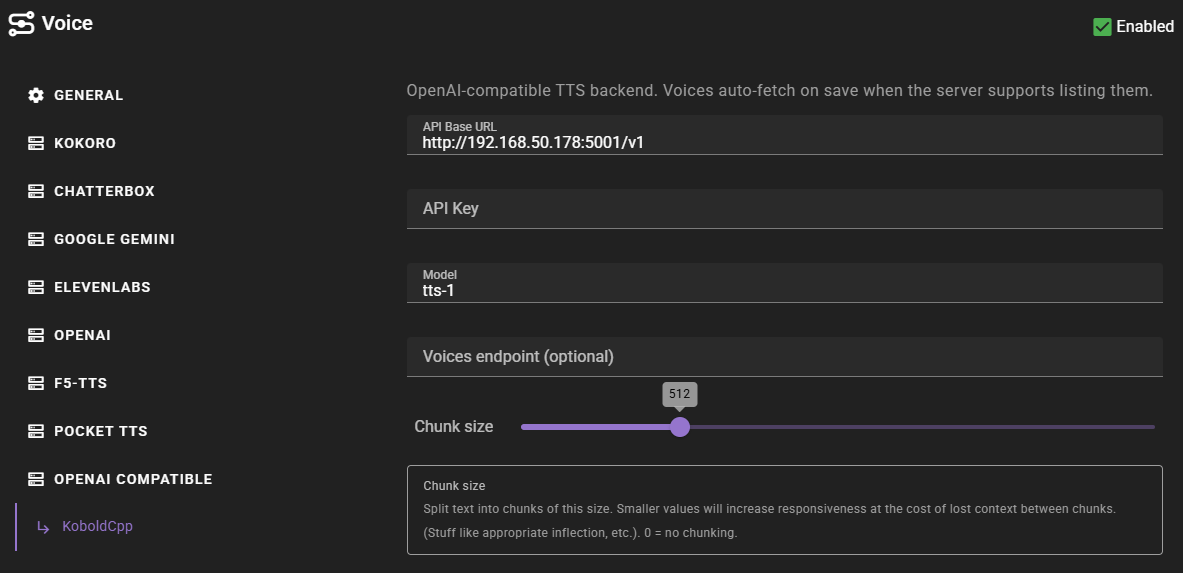
Each backend renders its own sub-tab under the OpenAI Compatible parent.
API Base URL
Base URL of the OpenAI-compatible TTS server, including the /v1 path. Default: http://localhost:8000/v1.
The backend reports API URL not set and will not generate audio until this value is provided.
This field saves on blur, so you can edit it and immediately use Refresh voices without closing the agent settings dialog.
API Key
API key for the server. Leave empty if the server does not require authentication — Talemate will send a placeholder value so the underlying OpenAI client accepts the request. This field saves on blur.
Model
Model identifier sent with each request. Some servers ignore this field and always use the model they have loaded; others route based on it. Check your server's documentation. Default: tts-1.
Voices endpoint (optional)
Override the path Talemate uses to list voices. Leave empty to probe a small set of common defaults (see Refresh voices). Accepts:
- A relative path (e.g.
audio/speech/voices) — resolved against the API base URL. - An absolute path (e.g.
/voices) — anchored to the host root. - A full URL (e.g.
https://example.com/list-voices) — used as-is.
Use this when your server exposes a non-standard listing path. This field saves on blur.
Chunk size
Split text into chunks of this size before sending to the server. Smaller values increase responsiveness at the cost of losing context between chunks (inflection, pacing, etc.). 0 disables chunking. Default: 512. Range: 0–2048, in steps of 64.
Refresh voices
Each backend row on the management tab has a Refresh voices button. Pressing it asks the server for the voices it can produce and merges the result into the global voice library, keyed under the backend's slug.
The auto-fetcher tries the optional Voices endpoint first. If none is configured, it probes a few common compat-server paths in order:
| Path (relative to base URL) | Used by |
|---|---|
audio/voices |
KoboldCpp |
audio/speech/voices |
Speaches |
voices |
openedai-speech |
The first path that returns a valid voice list wins. Talemate accepts both flat arrays (["alloy", "echo"]) and object payloads ({"voices": [...]} / {"data": [...]}), with each entry being either a plain string or an object carrying id / voice_id / name plus an optional label or display_name.
Servers without a listing endpoint
Not every OpenAI-compatible server exposes a voice listing — OpenAI proper, for instance, does not. In that case Refresh voices comes back with zero entries and a status toast surfaces saying so. Add the voices you want manually in the Voice Library (see below).
If your server uses a non-standard path, set Voices endpoint instead of relying on the probes.
Adding voices manually
Voices that aren't auto-fetched can be added manually through the Voice Library:
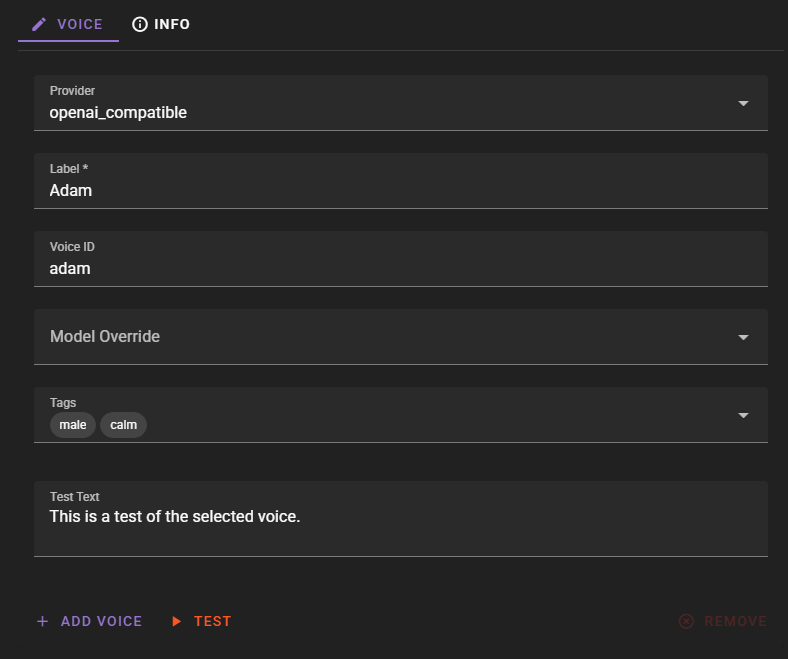
- Open the Voice Library from the main application bar.
- Click New.
- Select the backend (each registered backend appears as its own provider option).
-
Fill in the voice:
- Label — Display name shown in Talemate.
- Provider ID — The voice identifier your server expects (e.g.
alloy, or a custom voice name defined by the server). - Tags — Optional descriptive tags for organization and filtering.
Refer to your TTS server's documentation for supported voice identifiers. Once added, voices can be assigned to characters or used as the narrator voice.
Auto-managed backends
Some Talemate clients can register a backend on this tab automatically when they have a TTS model loaded. The clearest example is KoboldCpp, which registers a backend pointing at its own URL and refreshes its voice list as soon as it sees a TTS model.
Auto-managed backends behave the same as manually-added ones once registered. If the underlying client later stops serving TTS (for example, KoboldCpp restarts without a TTS model), the backend's slug is dropped from Enabled APIs but its configuration is kept, so it re-enables cleanly the next time the server comes back.
The agent-level Automatic Setup toggle controls whether any client is allowed to register or toggle backends this way.
Troubleshooting
Connection errors: Verify the base URL is correct (including the /v1 path) and that the server is running and reachable from Talemate.
Empty or silent audio: Confirm your server has a TTS model loaded and that the voice ID you sent is valid for that model. Some servers fall back silently when given an unknown voice.
Authentication errors: If your server requires an API key, make sure it is set in the per-backend settings. Otherwise leave the field empty.
Refresh voices returns nothing: Either the server has no listing endpoint (add voices manually) or the listing path is non-standard (set Voices endpoint explicitly).
See also the general TTS Troubleshooting Guide.