Tracked states
What is a tracked state?
Tracked states occassionally re-inforce the state of the world or a character. This re-inforcement is kept in the context sent to the AI during generation, giving it a better understanding about the current truth of the world.
Some examples could be, tracking a characters physical state, time of day, or the current location of a character.
Track a character's state
Character states are managed in the character editor
The fastest way to get to the character editor for a specific character, is to click on the character's name in the world state.
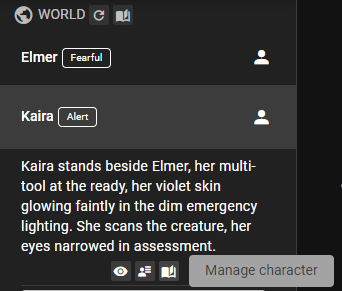
Click the Manage Character button.
Then follow the instructions at Tracking a character state.
Inspect the state value
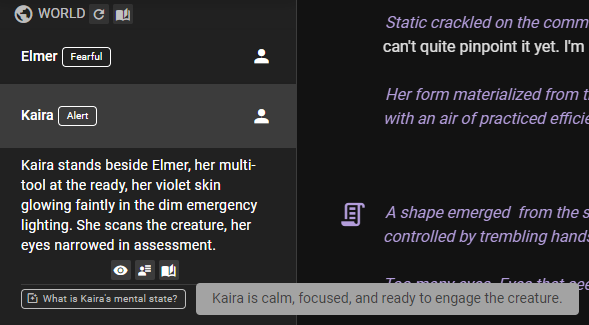
Once the state has been generated, you can see the current value in the world state entry for the character.
Track a world state
When tracking a world state, we mean the state of anything that is not a character. This could be the time of day, the current location, or the state of an object.
World states are managed in the world editor
In the top navigation bar, click World Editor tab.
Then follow the instructions at Tracking a world state.
Quickly apply often tracked states via templates

Any state template you have favorited appears under its target in the world state menu — the player character, each NPC, and World each get a submenu of the favorites relevant to them. Your list may be different than the one shown here, depending on what you have favorited.
Clicking a favorite generates the current state and keeps it tracked until it is removed. A state that is already tracked is marked with a checkmark; clicking it opens the state in the World State Manager instead of creating a duplicate.
Context Attachment Method
The state's Context Attachment Method determines how the state is attached to the context.
Passive
The state is included in reply context through relevancy, handled by the Memory Agent. For character states only, perception analysis in Character perspectives mode also receives every answered state, including Passive states, with the time since it was last set or confirmed.
Sequential
The state is inserted into the context as part of the scene progression. So when it's re-evaluated, it will be at the bottom of the context.
A new answer replaces the previous answer only when the previous answer is among the last 10 messages. Otherwise the previous answer stays in the scene history, so with the default interval the answers collect in the history as the scene goes on. A change to another method removes every answer of this state from the scene history.
This is the default for character states.
Each answer shows in the scene as a compact State Update row that names the character (or World) and the question, for example State Update · Mara — What is Mara's current mood?. Click the row to read the answer, and click it again to fold it away. A long answer shows its first lines with Show more.

- Edit: hover the unfolded row to see Double-click to edit., then double-click the answer, change it and press Enter (Shift+Enter starts a new line, Esc cancels). Later generations use your text. Editing the newest row of a state also makes it the state's current answer, the one you see in the World Editor; editing an older row changes only that row. When later messages follow the row, a note warns that they may no longer match it.
- Remove: hover the row and click . This removes that answer from the scene history; the state stays tracked.
- Hide: switch off Show for State Reinforcements in Settings → Appearance → Messages. Hidden rows still reach the AI.
Conversation Context
The state is ALWAYS inserted as an important part of the context during the character's dialogue generation. This is useful for states that are important for the AI to know about during conversation.
All Context
The state is always included in the context, no matter what. This is useful for states that are important for the AI to know about at all times.