llama.cpp Client
This requires you to have a llama.cpp server running
If you do not have a llama.cpp server running, you can follow the setup instructions in the llama.cpp GitHub repository.
The llama.cpp client connects to the llama-server executable from the llama.cpp project. This is an efficient, lightweight way to run local LLM inference.
If you want to add a llama.cpp client, go to Settings → Connections → Clients, click Add client and pick llama.cpp from the client type menu.
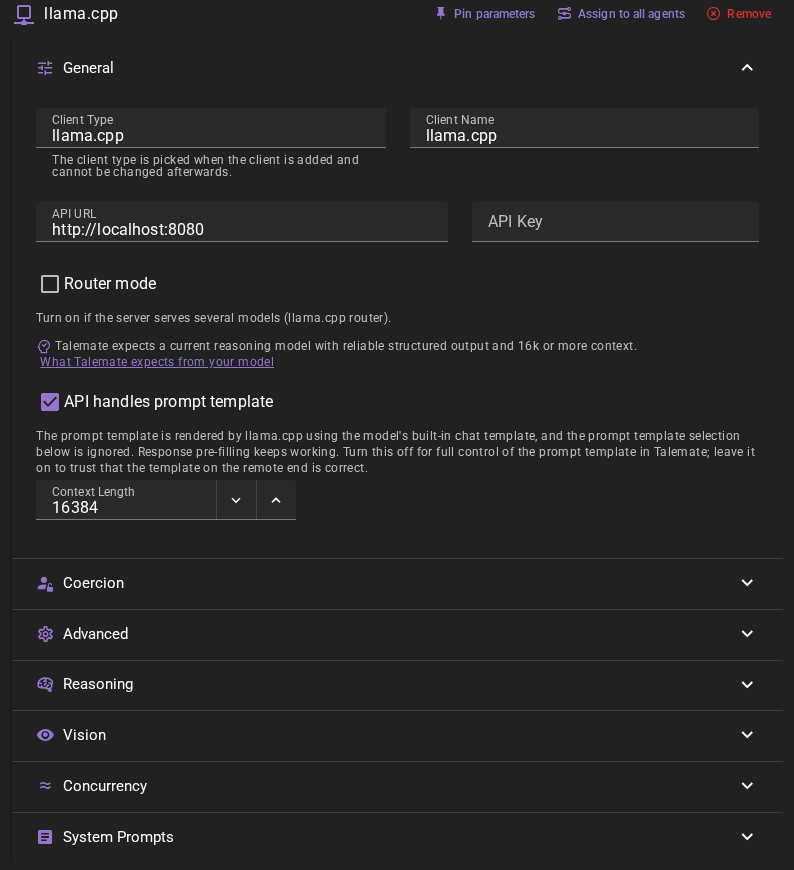
Should work out of the box with a local llama.cpp server
The default values should work with a local llama.cpp server if you are running llama-server on the default port (8080).
Click Save in the toolbar to add the client.
Ready to use
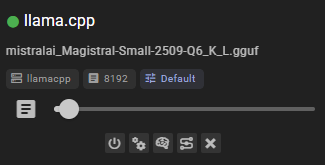
Once added, the client should appear in the clients list and display the currently loaded model.
For a server that serves several models, turn on Router mode, choose a Model, and click Save. Each client keeps its own selection, so you can add two clients with the same API URL and use a different model for each.
Settings
Client Name
A unique name for the client that makes sense to you.
API URL
The URL of your llama.cpp server, without any path. For example, http://localhost:8080.
The llama.cpp server (llama-server) defaults to port 8080, so unless you changed the port when starting the server, the default URL should work.
API Key
If your llama.cpp server is configured to require authentication, you can set the API key here. Most local setups do not require this.
Router mode and Model
Turn on Router mode if the server serves several models (llama.cpp router). The Model field appears only while this checkbox is on. Pick the model this client uses, or type its exact server ID if it is not listed. Keep paths and tags intact: team/model:Q4 and model:Q4 may refer to different models. Talemate never chooses a router selection for you.
Router mode defaults to off. With it off, the client uses single-model behavior. If Talemate detects a router, the editor and client status show: "Router detected. Turn on Router mode to pick a model." Turn on the checkbox to use that router; detection does not turn it on for you.
When Router mode is on, a small routing icon appears beside the client name in the AI clients list. It stays there while the client is disabled, and its tooltip and screen-reader label read Router mode.
The selection is saved per client and survives status refreshes and reconnects. It applies to native generation, API handles prompt template, and vision requests. Status checks only read server properties and the model list; they do not load or swap models.
If you used a router before 0.40.0, turn on Router mode and check Model after you upgrade.
With autoload enabled, models load on demand. The first request can take longer, especially when switching models. A server with room for only one model may swap models between clients. Remote template application waits for this loading too. You can cancel the Talemate request while waiting.
API handles prompt template
When enabled, Talemate sends the request to the server's /v1/chat/completions endpoint, so llama.cpp renders the prompt through the model's built-in chat template instead of Talemate applying a prompt template itself. Coercion (pre-filling the beginning of the response) keeps working: the server continues a trailing assistant message.
This is on for new clients. It is a trade-off: turn it off for full control of the prompt template in Talemate, or leave it on to trust the model's built-in chat template on the server — useful when you don't know which prompt template to pick. A client you saved before keeps its saved setting; only clients you add from now on start with it on.
Turning the checkbox off shows the Prompt Template picker in the editor right away, before you save, so you can choose the template in the same edit. Turning it on hides the picker again.
Reasoning models work as usual — enable Reasoning on the client and llama.cpp returns the thinking separately from the answer, so only the answer reaches the story and the thinking is stored as the reasoning. Talemate asks the server to separate it with reasoning_format, which overrides a server started with --reasoning-format none. If a server still leaves the thinking in the answer, Talemate strips it with the configured reasoning pattern, and that pattern has to match the model's tags. An answer the pattern does not match is used as it is, because the model may not have thought at all. To get an error instead, fill in the Validation pattern (reasoning start) on this client (the model presets under Reasoning, such as <think>, fill it; Default clears it) and keep Pattern Not Found Behavior on Fail, the default: thinking that starts but cannot be stripped then raises an error. A validation pattern shown as a template default does not count while API handles prompt template is on; it has to be set on the client. When Reasoning is disabled, Talemate asks thinking-capable templates (Qwen, GLM, ...) not to open a think block via enable_thinking.
Reasoning Mode and Reasoning Effort
Found in the Reasoning section of the client editor and used while Reasoning is on. Reasoning Mode chooses how the thinking is controlled and defaults to effort:
| Setup | effort (default) | tokens |
|---|---|---|
API handles prompt template on (/v1/chat/completions) |
Sends Reasoning Effort as reasoning_effort. default sends nothing; none turns the thinking off. |
Sends Reasoning Tokens as reasoning_budget_tokens, and llama.cpp cuts the thinking off once it reaches that many tokens. A budget of 0 allows no thinking at all. |
API handles prompt template off (/completion) |
Sends nothing. | Sends nothing. |
llama.cpp hands reasoning_effort to the model's chat template. A level other than default and none changes the output only if the template uses it, so a model such as Qwen3, whose template ignores the level, answers the same at low and at high. The client card shows the effort dropdown when the effort is sent (effort mode with API handles prompt template on), and the token field otherwise.
On /completion, llama.cpp ignores these fields: the raw prompt has no chat template, and the thinking budget needs the model's thinking start and end tags, which Talemate does not know. There Reasoning Tokens only adds room to the response limit, as it does in the other mode. The Reasoning Mode and Reasoning Effort settings take effect once you turn API handles prompt template on.
In both modes Reasoning Tokens also adds room to the response limit, so the thinking does not use up the answer. In tokens mode a very small budget can push the thinking into the answer. Turning Reasoning on lifts a budget of 0 to 1024, so 0 only applies when you type it afterwards. Existing llama.cpp clients start in effort mode with effort default, which sends nothing.
Context Length
The number of tokens to use as context when generating text. Defaults to 16384.
Parameters
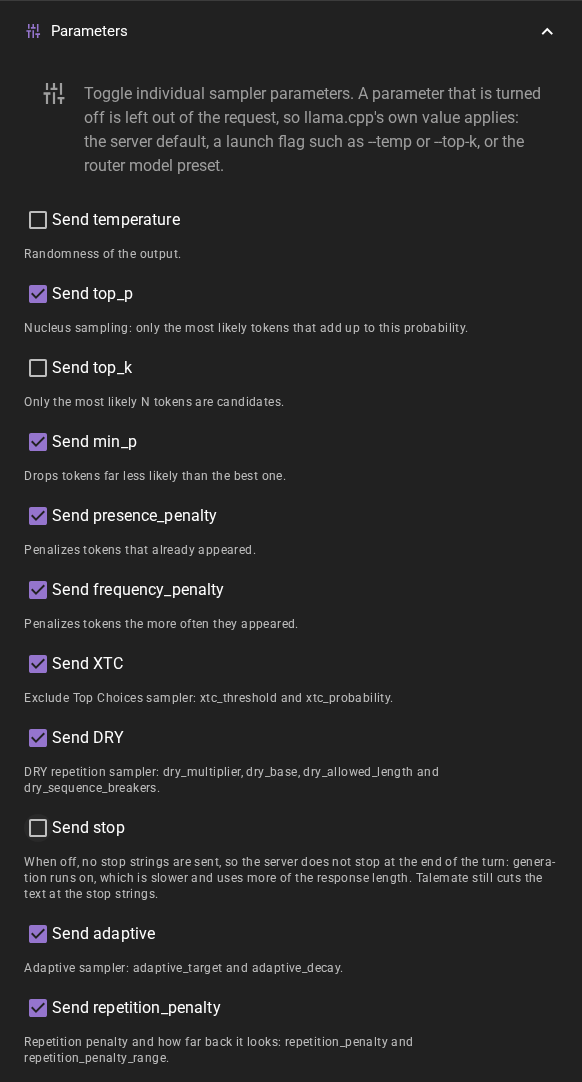
Found in the Parameters section of the client editor. Each toggle decides whether Talemate sends a sampler parameter with every request. When a toggle is off, the parameter is left out of the request completely, and llama.cpp uses its own value instead: the server default, a launch flag such as --temp or --top-k, or the preset of the router model you picked.
This is useful when you tuned the sampler on the server side, for example in a router model preset, and want Talemate to leave it alone.
Every toggle is on for a new client, and a client you saved before keeps sending everything it sent.
| Toggle | What it controls |
|---|---|
| Send temperature, Send top_p, Send top_k, Send min_p, Send presence_penalty, Send frequency_penalty | One parameter each. |
| Send XTC | xtc_threshold and xtc_probability together. |
| Send DRY | dry_multiplier, dry_base, dry_allowed_length and dry_sequence_breakers together. |
| Send adaptive | adaptive_target and adaptive_decay together. |
| Send repetition_penalty | repetition_penalty and repetition_penalty_range together. |
| Send stop | The stop strings, such as the other characters' names in a conversation. |
XTC, DRY, adaptive sampling and the repetition penalty each work as one sampler, so each has a single toggle. A sampler's on/off value and its tuning values should come from one place, either all from Talemate or all from the server. Splitting them mixes two configurations: Talemate's defaults, such as an xtc_probability or dry_multiplier of 0, could switch off a sampler that the server's preset turned on.
Turning off Send stop
Without the stop strings the server does not stop at the end of the turn and keeps generating, so the request takes longer and uses more of the response length. Talemate still cuts the text at the same stop strings afterwards, so you do not see the extra text. Turn it off only if you set stop strings on the server yourself.
The response length is always sent.
Concurrent Inference
Found in the Concurrency section of the client editor. When enabled, batch operations that need several queries (currently visual prompt generation for image generation) can send multiple requests to your llama-server in parallel instead of one at a time, which can speed those operations up.
This is off by default. Your llama-server must be started with enough parallel slots to actually serve requests at the same time; otherwise the requests are queued and you will not see a speed-up. See the Concurrent Requests page for more detail.
Common issues
Router detected. Turn on Router mode to pick a model.
Turn on Router mode in the client settings, choose a Model, and click Save.
Select a router model / Selected model is not available
Open the client settings, choose a model from the list or enter its exact server ID, then click Save. An unavailable selection is kept so you can correct it; Talemate does not replace it with another model.
Model is loading / Model is unloaded and server autoload is disabled
Loading can take time, especially when switching models. If the server disables autoload, its operator must load the selected model before you use it. Talemate does not manage model loading or downloads.
Invalid API key
Check the client's API key against the server's authentication settings. A failed authentication check is reported separately from a missing model selection.
The error says an endpoint was not found
This client sends generations to the server's /completion endpoint, or to /v1/chat/completions when API handles prompt template is enabled. A server that does not implement the endpoint answers 404, and the error names it, for example POST /completion was not found on the server.
- For
/completion, the server probably only offers OpenAI-style chat completions. Use the OpenAI Compatible client with API handles prompt template enabled instead, and put/v1at the end of the API Url. - For
/v1/chat/completions, the server has no chat endpoint. Turn API handles prompt template off. - If the API Url ends in
/v1, remove it; this client adds its own paths. Keep a path prefix only if the server is started with--api-prefixor sits behind a proxy at that path, and make the URL match it. Otherwise use the server root, for examplehttp://localhost:8080.
Generations are weird / bad
Make sure the correct prompt template is assigned. Talemate will attempt to automatically detect the appropriate prompt template based on the model name, but this does not always work.
Could not connect
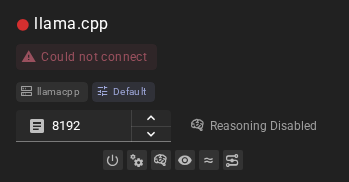
This means that either:
- Your llama.cpp server (
llama-server) is not running - The API URL is incorrect
- The connection is blocked (for example, by a firewall)
Make sure the server is running before attempting to connect. You can start the server with a command like:
llama-server -m /path/to/your/model.gguf
Response Length Enforcement
Controls whether token limits and/or human-readable response length instructions are sent with prompts. Defaults to Limit tokens and send instructions.
See Response Length Enforcement for details.