Model Testing Harness
New in 0.37.0
The Model Testing Harness is a bundled scene shipped with Talemate. No installation is needed beyond updating to 0.37.0.
The Model Testing Harness is a scene that runs a fixed suite of minimum-viability tests against the language model clients assigned to your agents. It is the fastest way to check whether a new model — especially a local one — can handle the response formats, function calls, and generation styles that Talemate relies on.
Passing every test does not guarantee good creative output, but any failure is a strong signal that the model is likely to struggle with Talemate's more complex features.
When to use it
- Qualifying a new local model before using it for real scenes.
- Confirming that a newly configured client (API URL, prompt template, data format, section format) actually produces the output Talemate expects.
- Diagnosing a model that started to behave oddly after a settings change — a failing test in a specific category points at the subsystem that is broken.
Loading the scene
The harness is a normal Talemate scene and loads the same way as any other — see Load a scenario for the general flow.
- From the Home screen, type
modelinto the Filter scenes field of the Scene Library. - Click the
model-testing-harness.jsonsave file in the model-testing-harness project.
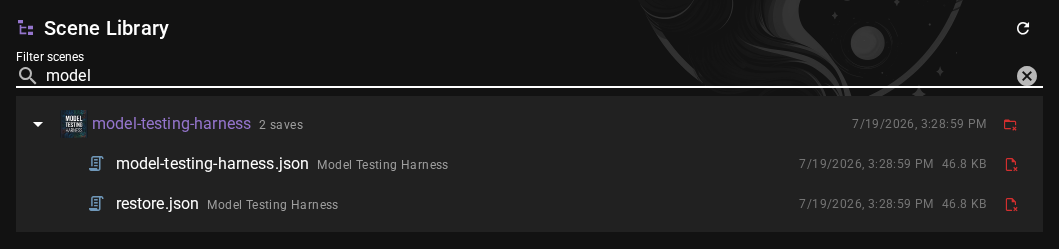
The tests start automatically as soon as the scene finishes loading — there is no separate "run" button to press.
What the tests exercise
The harness runs a sequence of six tests. Each test calls into one of the regular Talemate agents, which means the client currently assigned to that agent is the one being evaluated.
| # | Test | Agent used | What it checks |
|---|---|---|---|
| 1 | Basic Instruction Following | Director | That the model produces a short response containing the literal tagged pattern <TEST>Start</TEST>, exactly as instructed. |
| 2 | Data Response Instruction Following | Director | That the model can return a well-formed data structure (JSON or YAML, depending on the client's Structured Data Format setting) matching a specified schema. |
| 3 | Conversation Generation | Conversation | That the conversation agent can generate dialogue for a specific named character without derailing. |
| 4 | Narrative Generation | Narrator | That the narrator agent produces continuous narrative prose without collapsing into character dialogue lines (no VERA-7: / NIKO-12: style prefixes). |
| 5 | Function Calling | Director + Summarizer | That the model can reliably call a sequence of tool functions (put_into_container, remove_from_container, empty_container) through Talemate's FOCAL function-calling system to complete a multi-step task. |
| 6 | Problem Solving | Director + Summarizer | That the model can reason about a starting state vs. a desired state and produce the correct sequence of function calls to transform one into the other. |
Because each test targets a specific agent, the harness effectively covers every client in your current setup — if two agents share a client, that client is tested through both of them.
Watching the tests run
While the suite is running, a Tests Running status banner is shown above the chat. Each test emits its own system message in the scene log as it finishes:
- Green check icon — the test passed.
- Red cross icon — the test failed.
The message title is the test name (for example, "Basic Instruction Following") followed by SUCCESS or FAILURE, and the body repeats a short description of what the test was looking for.
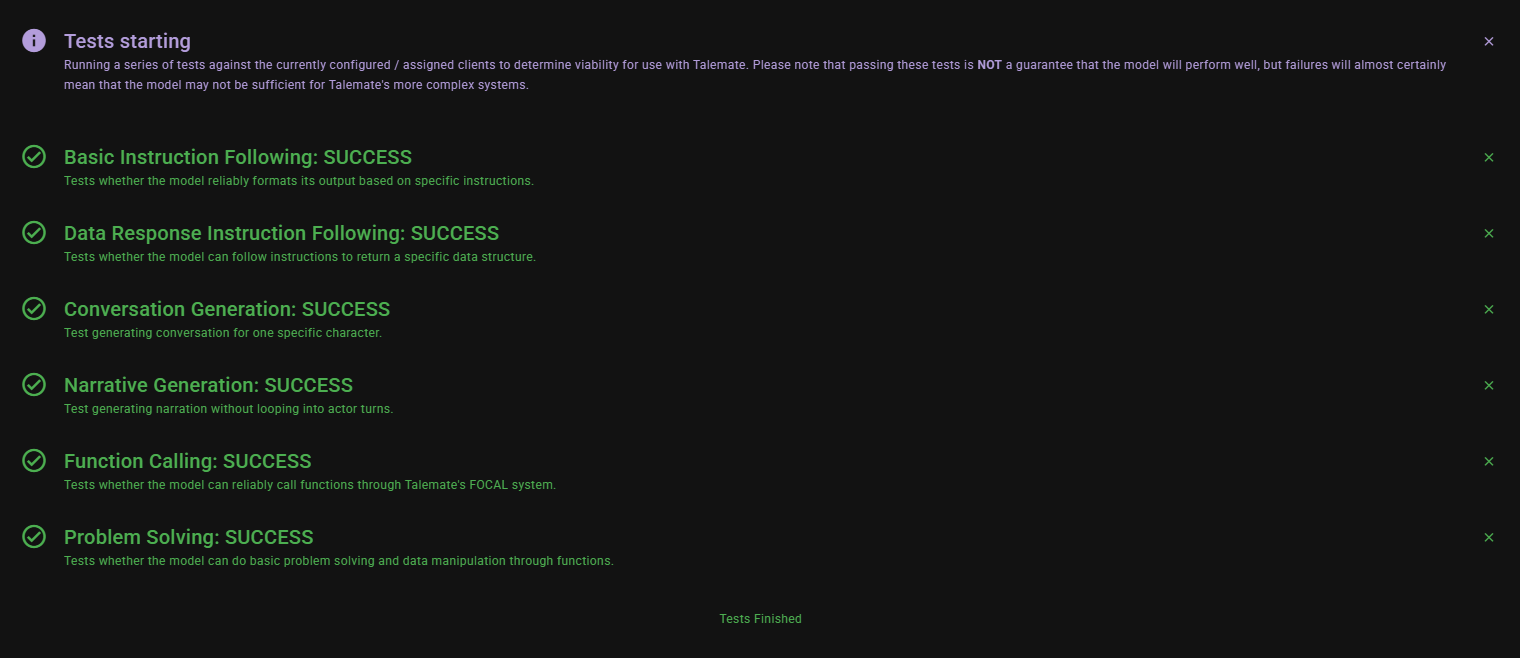
When all six tests are finished, the status banner changes to Tests Finished.
Interruptions
If the run is cancelled (for example by cancelling generation), the banner changes to Tests Interrupted. Reload the scene to start the tests again from the beginning.
Interpreting results
A failure tells you that the model under test could not satisfy a specific minimum-viability requirement:
- Basic Instruction Following fails — the model is not reliably following literal formatting instructions. Expect downstream problems with almost any structured Talemate feature.
- Data Response Instruction Following fails — the model struggles to return JSON/YAML in the format Talemate requests. Check the client's Structured Data Format setting on the Advanced tab and confirm the chosen format is one the model can actually produce.
- Conversation Generation fails — the conversation agent's client is producing output Talemate cannot parse as a single character's dialogue.
- Narrative Generation fails — the narrator's output contains dialogue markers like
VERA-7:orNIKO-12:, meaning the model is slipping into actor-style output instead of continuous prose. - Function Calling fails — the model cannot reliably produce function calls in the format required by FOCAL. This will disable most of the director's advanced tooling.
- Problem Solving fails — the model can call functions in isolation but cannot chain them correctly to solve a multi-step task.
To re-run the suite after changing a client setting, reload the scene.
Related
- Client Configuration — includes the Structured Data Format and Section Format settings that the data-response test exercises.
- Prompt Templates — a wrong template is a common reason for the instruction-following tests to fail on local models.
- Recommended Local Models — general guidance on choosing a local model.