Section Format
New in 0.37.0
Per-client setting that controls how prompt sections are delimited. Found on the Advanced tab of the client configuration dialog.
Talemate's prompt templates split their content into named sections (for example Characters, Scene, Task). The Section Format setting controls how those section boundaries are rendered in the text that is sent to the model.
Options
| Option | Effect |
|---|---|
| Talemate decides (default) | Uses Talemate's built-in default, which is the same output as Markdown. Leave this selected unless you have a reason to pick something specific. |
| Markdown | Sections open with a Markdown heading, for example ## Characters. There is no closing marker. |
| XML | Sections are wrapped in paired uppercase tags, for example <CHARACTERS>...</CHARACTERS>. Spaces in section names become underscores. Empty lines at the start and end of a section are stripped. |
The setting only changes the delimiters Talemate inserts around sections. It does not change what information is sent, the order of sections, or any other part of the prompt.
Where to set it
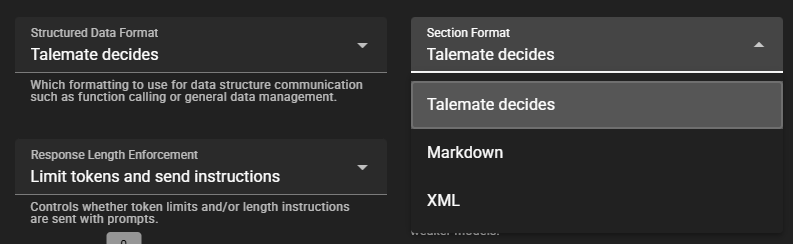
- Click the cogwheels on a client in the sidebar to open its configuration dialog.
- Open the Advanced tab.
- Pick a value from the Section Format dropdown, next to Structured Data Format.
- Click Save.
When a non-default value is set, the current choice is shown as a small tag in the client's row in the sidebar so you can see at a glance which clients are using which format.