Outline
The outline describes the scene and its contents. Its where you manage the title, description and introductory text shown to the user when they first enter the scene.
Click on the World Editor to open the world editor.
In the world editor the Scene tab should be selected, if not, click on it.
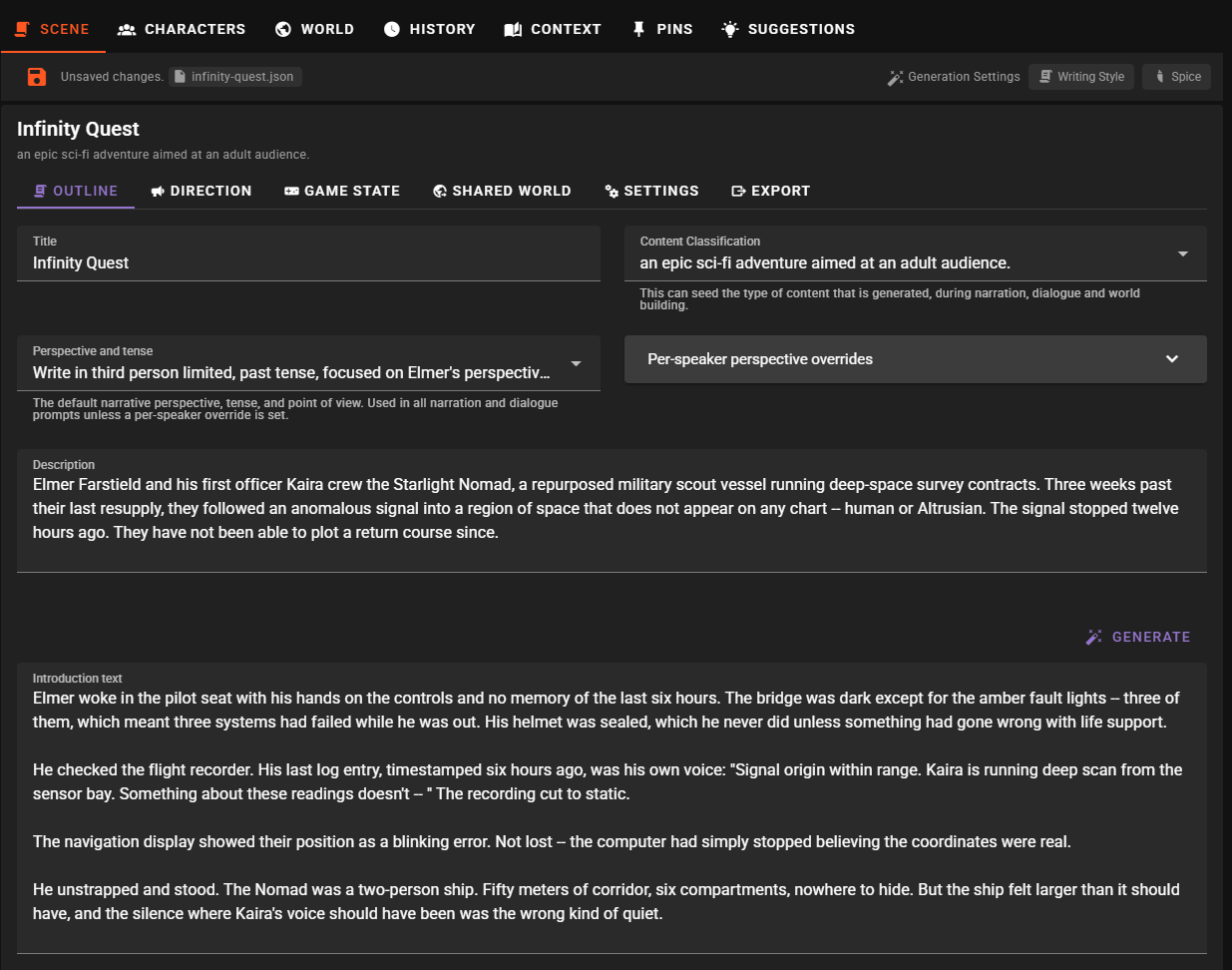
Title
The scene title as it will be shown to the user. Currently this should be New Scenario
Example
The Forgotten House
Content Classification
The Content Classification is used to set the tone and expectation of the generated content, it can strongly influence the AI's responses.
You can type in a value or pick something from the list.
Note
What is available in the list is controlled in the application settings under the Storytelling group.
Example
A terrifying adventure with lovecraftian elements
Perspective and Tense
Updated in 0.38.0
The single perspective field was replaced by a set of four configurable perspectives: a scene-wide default plus three per-speaker overrides (player, NPCs, narrator). The {player_name} placeholder was also added. Scenes saved with the older field are migrated automatically — their value becomes the new default.
The narrative perspective and tense for the story — for example Third person limited, past tense or Second person, present tense. When set, the value is injected into the context the AI sees for narration, dialogue, and autocomplete prompts, so the model knows which point of view and tense to write in.
A perspective usually combines three things:
- Person — who the prose talks about and how it refers to them.
- First person uses "I"/"me"/"my" — the narrator is the character. "I walked up to the door."
- Second person uses "you" — the narrator speaks to the reader as if they are the character. "You walk up to the door." Common in interactive fiction and choose-your-own-adventure styles.
- Third person uses "he"/"she"/"they" — the narrator describes the characters from outside. "She walked up to the door."
- Tense — when the action is happening relative to the telling.
- Past tense reads like a recollection: "walked", "said", "thought". "She walked up to the door and knocked."
- Present tense reads like a live broadcast: "walks", "says", "thinks". "She walks up to the door and knocks."
- Point of view (POV) — how much the narrator knows.
- Limited — the narrator is tethered to one character's head and only knows what they know. Other characters' thoughts and off-screen events are off-limits. Usually anchored to a named character (often the player).
- Omniscient — the narrator floats above the scene and can dip into anyone's thoughts, describe off-screen events, or foreshadow what's coming.
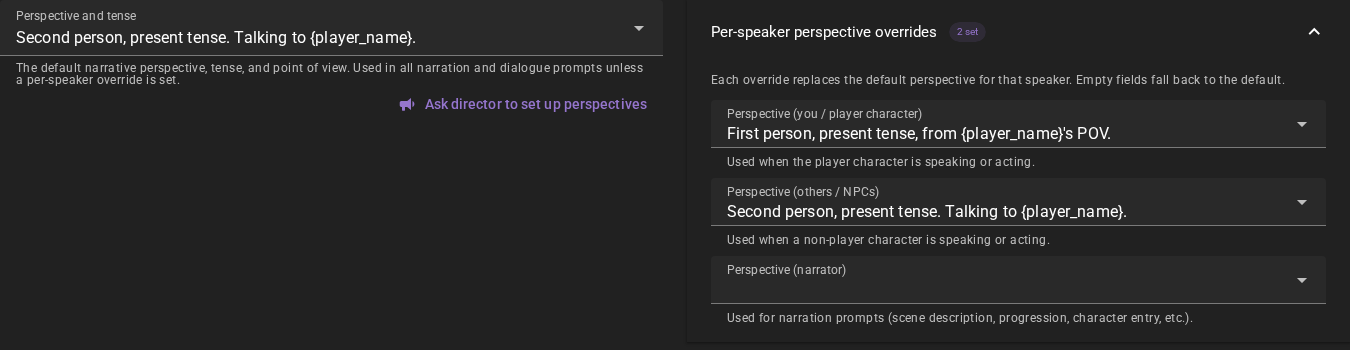
Talemate exposes the perspective configuration as four separate fields:
| Field | When it's used |
|---|---|
| Perspective and tense (default) | Used everywhere the scene needs perspective context, and as the fallback for any of the three role-specific slots below when they are empty. |
| Perspective (you / player character) | Used when the player character is the one speaking or acting in a dialogue prompt. |
| Perspective (others / NPCs) | Used when a non-player character is speaking or acting. |
| Perspective (narrator) | Used for narrator agent prompts — scene description, story progression, character entry / exit, time passage, and so on. |
The three role-specific fields live behind the Per-speaker perspective overrides expansion panel next to the default field. A small chip on the panel header tells you how many overrides are set.
Choosing or typing a value
Each of the four fields is a combobox. You can:
- Pick a preset from the dropdown.
- Type a custom value — the field accepts any free-form text and your custom entry is saved with the scene whether or not it matches a preset.
New in 0.40.0
Each preset that ships with Talemate carries a two-line subtitle in the dropdown: what it means in plain English, and a sample of the prose it produces, with the player character's name filled in. A preset you added or renamed yourself has no subtitle. The subtitle is shown on the dropdown only — the field and the saved value keep the bare preset string.
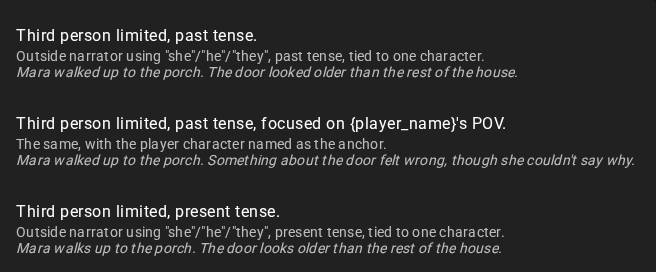
The dropdown list is shared by all four fields and is managed in Settings → Storytelling → Perspective Presets. See Storytelling settings for how to add, remove, or rename presets.
The {player_name} placeholder
Any field that contains the literal string {player_name} will have that substring replaced by the active player character's name at prompt render time. This means presets like:
First person, present tense, from {player_name}'s POV.
work for every scene without you having to edit them, and they survive renaming the player character.
If the scene has no explicit player character, perspectives that reference {player_name} are suppressed rather than substituted — the placeholder has no anchor to point at, so injecting it would produce broken prose like "Talking to the player.". Pick a non-placeholder preset for scenes without a player character.
Ask the director to set it up
New in 0.40.0
Below the Perspective and tense field is an Ask director to set up perspectives action. It opens the director console, starts a new chat and asks the director to set the perspectives up for you, based on the prose the scene has so far.
The director reads what is already written and writes the fields itself. When the scene carries too little prose to tell, it asks you what you are looking for instead, and suggests something that suits most readers. The presets configured in Settings → Storytelling → Perspective Presets travel with the request, so what it picks is normally one you recognise in the dropdown.
The action needs a loaded scene and a working director agent. Everything it writes is an ordinary scene change: you can edit the fields afterwards, and the change is saved with the scene.
Fallback semantics
The four fields cascade in a predictable way:
- An empty role-specific override falls back to the default.
- An empty default means no perspective line is injected at all — the AI is left to match whatever tense and POV the existing scene history establishes (the dialogue prompt has a short instruction that handles this case automatically).
You only need to fill in the fields that matter for your scene. Most scenes only need the default.
What each default preset means
This table lists the presets that ship with Talemate, what each one means in plain English, and a tiny sample of the kind of prose it produces (using Annabelle as the player character).
| Preset | What it means | Sample prose |
|---|---|---|
Third person limited, past tense. |
Outside narrator using "she"/"he"/"they". Past tense ("walked"). Anchored to one character — usually whoever the scene establishes as the POV character. | "Annabelle walked up to the porch. The door looked older than the rest of the house." |
Third person limited, past tense, focused on {player_name}'s POV. |
Same as above, but explicitly tells the AI the player character is the anchor — the narration can read her thoughts, but not the NPC's. | "Annabelle walked up to the porch. Something about the door felt wrong, though she couldn't say why." |
Third person limited, present tense. |
Outside narrator using "she"/"he"/"they". Present tense ("walks"). Reads like a live broadcast. | "Annabelle walks up to the porch. The door looks older than the rest of the house." |
Third person limited, present tense, focused on {player_name}'s POV. |
Same as above, anchored to the player character. | "Annabelle walks up to the porch. The door looks wrong to her, somehow." |
Third person omniscient, past tense. |
Outside narrator using "she"/"he"/"they", past tense. The narrator knows everything — NPC thoughts, off-screen events, things the player character can't see. | "Annabelle walked up to the porch, unaware that someone was watching her from an upstairs window." |
Third person omniscient, present tense. |
Same as above, in present tense. | "Annabelle walks up to the porch. Inside, the homeowner watches her approach through the curtains." |
First person, past tense, from {player_name}'s POV. |
The player character herself narrates, using "I"/"me"/"my". Past tense — reads like a journal entry or recollection. | "I walked up to the porch. The door looked older than the rest of the house." |
First person, present tense, from {player_name}'s POV. |
The player character herself narrates, using "I"/"me"/"my". Present tense — reads like an unfolding inner monologue. | "I walk up to the porch. The door looks older than the rest of the house." |
Second person, present tense. |
The narrator addresses an unnamed "you" — classic interactive-fiction voice. Present tense. | "You walk up to the porch. The door looks older than the rest of the house." |
Second person, present tense. Talking to {player_name}. |
Same as above, but the narrator explicitly knows the player character's name and may use it. | "You walk up to the porch, Annabelle. The door looks older than the rest of the house." |
You are not limited to these — type anything into the field and it will be passed to the AI verbatim. The presets are just shortcuts for the most common configurations. See Storytelling settings → Perspective Presets for how to add your own.
Common patterns
Standard novel (third person limited, single POV character)
| Field | Value |
|---|---|
| Default | Third person limited, past tense, focused on {player_name}'s POV. |
| Player | empty |
| Other | empty |
| Narrator | empty |
Interactive fiction / "you are the protagonist"
| Field | Value |
|---|---|
| Default | empty |
| Player | empty |
| Other | empty |
| Narrator | Second person, present tense. Talking to {player_name}. |
The narrator drives the whole scene in second person and no perspective line is added to dialogue or analysis prompts.
Mixed POV — first person for the player, third for everyone else
| Field | Value |
|---|---|
| Default | empty |
| Player | First person, present tense, from {player_name}'s POV. |
| Other | empty |
| Narrator | Third person limited, past tense, focused on {player_name}'s POV. |
When the player character is acting they get the first-person voice; the narrator and NPC dialogue stay in third person limited.
Exposed as context IDs
The perspective fields are also available as context IDs for features that work with context IDs (for example the Context Database):
story_configuration:perspective— alias for the default field (kept for backwards compatibility).story_configuration:perspective.defaultstory_configuration:perspective.playerstory_configuration:perspective.otherstory_configuration:perspective.narrator
Description
This should be an internal description - that will be included in the context sent to the ai, but not the player. It can be used to give the ai more information about the scene or how to treat certain elements.
Example
The player controls a young woman named Annabelle as her car breaks down in a secluded neighborhood on the outskirts of a non-descript town.
Its the year 2024 and her mobile phone has no signal, after walking for a while she comes across a plain looking house without any remarkable feature, it looks slightly out of place.
The scene starts after Annabelle has knocked on the door.
Introduction
The introduction is the first thing the player will see when they start the scene. It should set the stage and give the player an idea of what to expect.
There are two ways to set the introduction, you can either type it in directly or use the Generate button to have the AI generate an introduction for you.
1. Create manually
Type in the introduction text. The text should be engaging and set the stage for the scene.
Example
The engine coughed its last, sputtering and wheezing like a dying animal. You yanked the key out of the ignition, the silence that followed almost deafening. Great. Just great. Stranded in some godforsaken suburb on the outskirts of... well, you weren't even sure what town this was. All you knew was that your phone was about as useful as a chocolate teapot, its signal bars stubbornly stuck at zero.
Dust motes danced in the dying sunlight slanting through the windshield. You sighed, the weight of the situation sinking in. What were you supposed to do? Walk? In this heat? With night coming on? Your gaze drifted towards the only building within sight – a squat, two-story house with peeling paint and a porch that sagged like a tired old man. It wasn't exactly inviting, but it was something.
You grabbed your tattered backpack and started walking, the gravel crunching under your worn sneakers. The silence was unnerving, broken only by the occasional chirp of a cricket. Reaching the porch, you hesitated for a moment, then raised your fist and knocked three times.
The sound echoed in the stillness. What now?
Autocompletion
While typing you can hit ctrl+enter to generate a short autocompletion of the current text.
2. Generate
Click on the Generate button to have the AI generate an introduction for you.
Tip
Make sure to check out the Generation Settings to see how you can influence the AI's output.