Writing Styles and Decision Checks
Writing style templates are used to define a writing style that can be applied to the generated content. They can be used to add a specific flavor or tone. A template must explicitly support writing styles to be able to use a writing style template.
Shipped writing styles
Talemate comes with two writing styles in the default template group. Both include the default decision checks.
- Polished Prose: neutral, clear and easy-to-read prose with no genre flavour. It keeps the point of view, tense and tone your story already uses, and asks for plain words, varied sentences, the one detail that matters, no filler and dialogue that sounds like people talk. The Infinity Quest and Simulation Suite example scenes use it.
- Adventure Game: reads like a mid-90s point-and-click adventure. The narrator talks to you in the second person, describes a room or an object in a few short lines, points out what you can use and adds a dry joke now and then. Characters get big, distinct voices and give hints instead of solutions.
Select one in the Scene Settings, or use one as the starting point for your own style.
Creating a writing style
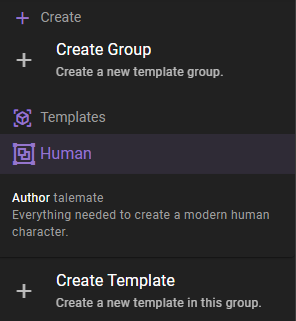
Fist, if you have not done so, create a template group to store the template in.
Then select the group you want to add the template to and click the Create Template button.
Next enter a template name and select Writing style as a template type.
Template name
The name / label of the template. This is the name that will be displayed in the list of templates.
Template type
Specify the type of template you are creating. In this case, select Writing style.
Once the template type is selected, the form will update to show the fields required for a writing style template.
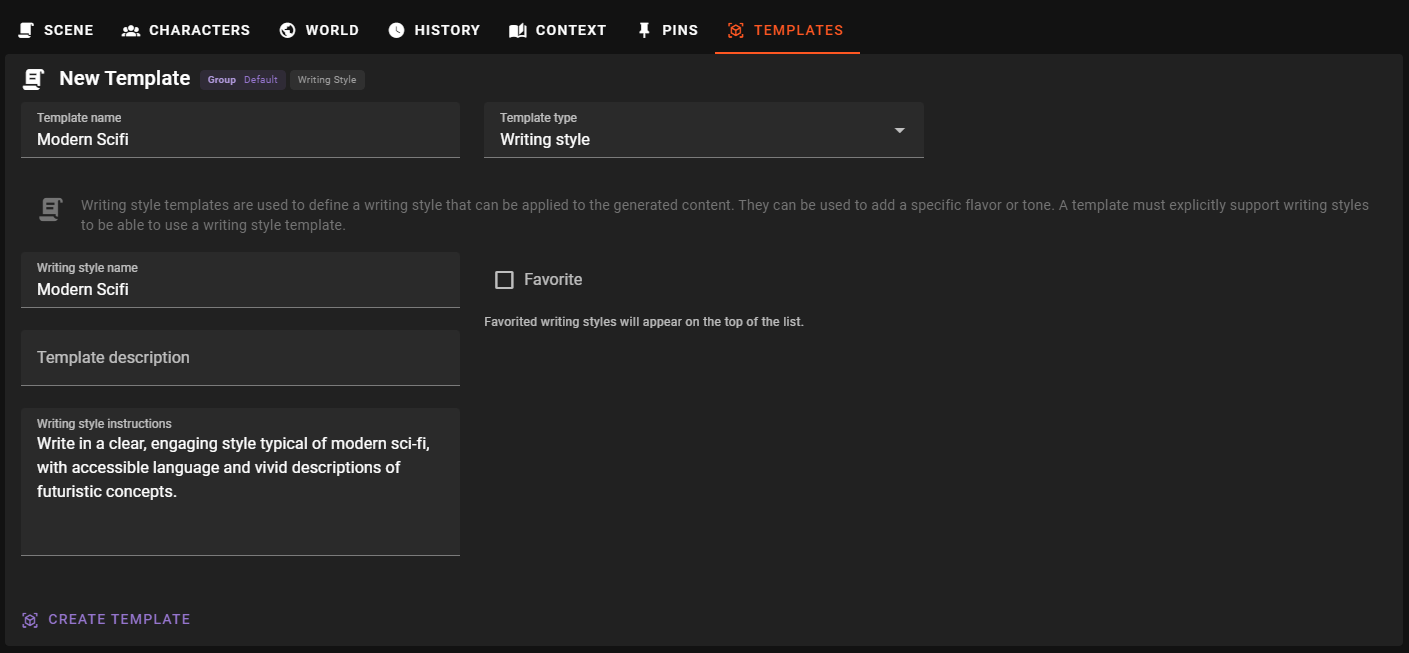
Template description
A longer description of the template. What is the purpose of the template? What should it be used for?
Writing style instructions
This should be the actual writing style instructions. It will be passed to the AI to generate content in the specified style.
Example
Write in a clear, engaging style typical of modern sci-fi, with accessible language and vivid descriptions of futuristic concepts.
or
Write like a 1940s hard-boiled detective novel. When you narrate, use short sentences and dry similes.
The instructions also reach summaries, world state updates and character sheets. Start a rule that only fits the story, such as a rule against repetition, with "When you narrate" or "In dialogue".
Favorite
Mark the template as a favorite to make it easier to find in the list of templates.
Favorited templates will be shown at the top of the list of templates.
Phrase Detection

Introduced in version 0.30.0 the writing style can now define certain phrases that should be detected in the content and handled in a specific way through the Editor Agent's Revision Actions.
Writing style needs to be set in the scene
In order for the writing style's phrase detection to work, the writing style needs to be set in the Scene Settings.
Specifically this allows you to define a list of phrases that you do NOT want in your content.
There are two methods of phrase matching
- Regex (Regular Expressions) - This will match any phrase that matches the regex pattern.
- Semantic Similarity - This will match any phrase that has a semantic similarity above the defined threshold. Semantic similarity is calculated using the Memory agent's embedding function.
Regex
While you can certainly do overly complex regex patterns, most of time you will simply want to do groups of words that should be removed.
For example
We're in this together as (a team|partners|friends)
This will match these three combinations:
- We're in this together as a team
- We're in this together as partners
- We're in this together as friends
If you are about to write a more complex pattern, consider switching to semantic similarity.
Semantic Similarity
Semantic similarity is a more flexible way to match phrases. It will match any phrase that has a semantic similarity above the defined threshold.
Warning
This has the potential to do A LOT of requests to the embedding model as each sentence in the content is compared to each phrase. Batching is used when available, but its not advisable to use this with remote embedding APIs at this point (openai etc.).
When running with local embeddings, using CUDA is highly recommended.
Deactivation
You can deactivate defined phrases by unselecting the Active checkbox, at which point it will no longer be considered for phrase detection.
Decision checks
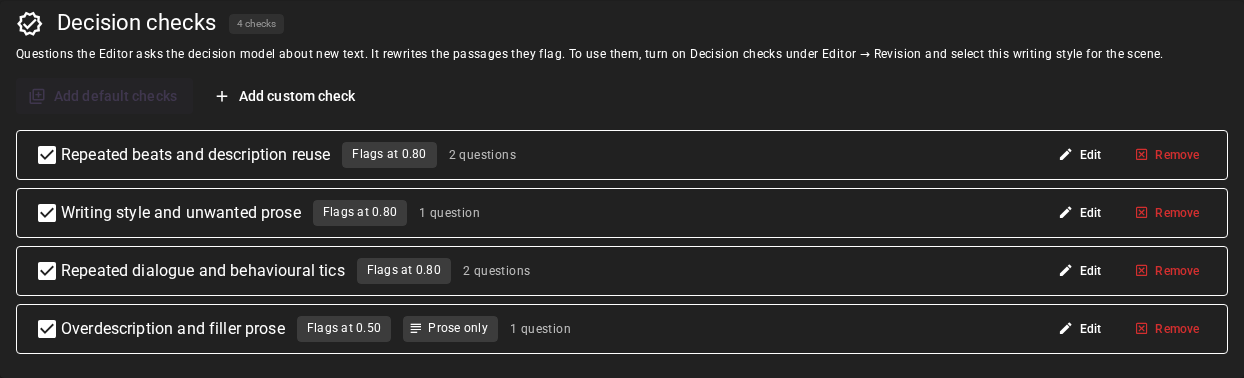
Decision checks are questions the Editor asks the optional Decision Model about new text, to find passages that need a rewrite. A writing style holds the checks and their settings, so different styles can ask different questions. New styles start with no checks.
Click Add default checks to add the common checks in one action, including while creating a new writing style. It adds:
- Repeated beats and description reuse, with separate questions for redundant story events and reused distinctive descriptions. The latter keeps the event and changes its description.
- Writing style and unwanted prose, which checks the style instructions and active phrase rules.
- Repeated dialogue and behavioural tics, with separate questions for a line or catchphrase a character keeps saying and a gesture or mannerism a character keeps making. It flags a habit the same character keeps coming back to, from the third use on: a keeper who says "Curious weather for it" once or twice has a voice; the fourth time, it is a tic. The same line from another character is not a finding.
- Overdescription and filler prose, which looks for description and filler that the moment does not need, such as stacked adjectives or sentences that only restate a mood ("Time itself seemed to slow"). Detail that serves the moment and a short beat such as "Nobody spoke." are not findings. It applies to Prose only, so a character who talks in long, ornate sentences is not flagged for it.
Each check starts at a probability threshold of 0.80, shown as Flags at 0.80 in the list; Overdescription and filler prose starts at 0.50. The button adds missing default questions without replacing your edits or adding duplicate questions. If a check with the same name already exists, the added check gets a numbered name, such as Repeated beats and description reuse (2).
Click Edit to change a check's name, Applies to scope, threshold and questions. Each question has a
Question, a Rewrite instruction and a Finding type. Use {passage_id} in a
question or its criteria to refer to the passage being evaluated. The model also receives
the full current text, preceding history, style instructions, active prose rules and,
for a character's line, that character's acting instructions.
The token is optional: without it, the Editor names the passage before your question.
Applies to chooses what the check judges in each passage:
- All text (the default) judges the whole passage.
- Dialogue only judges only the text inside double quotes.
- Prose only judges everything outside double quotes: narration and actions.
For example, a check "Does the dialogue sound modern?" on Dialogue only does not flag narration that describes a modern city. A passage with nothing in the chosen part is skipped for that check, and the Decision Log names the skipped passages. The list shows Dialogue only or Prose only next to the threshold of a check.
A message with an odd number of double quotes (a quote that is never closed, or a
measurement such as 6") has no reliable split between dialogue and prose. A
Dialogue only or Prose only check then judges all the text of that message,
as All text would.
More options under each question holds optional refinements of the question. A short note at the top of the section explains them:
- What counts as yes and What counts as no (the true and false criteria) help when the question alone leaves room for doubt. Fill in both to use them; if either is blank, the check uses its question without either criterion.
- Short name (the question ID) labels the question in the Decision Log. It must be unique within the style.
Click Apply check to keep the edit, or Cancel to discard it.
A check can contain several questions sharing one threshold. Use Add custom check to give another question its own threshold. For example, a terse mystery style could ask whether a passage explains a character's feelings instead of showing an action, and instruct the rewrite to replace that explanation with a physical detail. Its threshold can differ from the repetition check's threshold.
Finding type categorizes the finding as repetition or writing style/unwanted prose. The rewrite instruction tells the selected Revision method how to correct it. The Only run when this writing style has instructions or active prose rules option omits that check when neither kind of guidance is available. Uncheck a check to make it inactive, or click Remove to delete it.
When loading a shared or hand-edited template file, invalid check settings are repaired where possible and logged as warnings. An unusable check is omitted; the writing style's instructions and phrase rules remain available. Review the checks after importing a file that reports warnings.
To use the checks, select this writing style in World Editor → Scene → Settings, enable the Decision Model, then turn on Decision checks in Editor → Revision with Targeted Rewrite or Unslop selected. Successful checks replace the usual detection and can lead to at most one revision call. If no passage meets its check's threshold, the text stays unchanged. With no style selected, no checks, or no active applicable checks, Revision uses its usual detection without a decision request. See Editor settings for failure handling and the Decision Log.
Create the template
When you have filled out the form, click the Create Template button to create the template.
Using the writing style template
Please see the Generation settings section for general information on how to apply a writing style template during generation.
Example: Update character's description
Go to the Character Editor - Description section of the World Editor.
In the Generation Settings on top of the world editor, click the Writing Style dropdown and select the writing style template you just created.
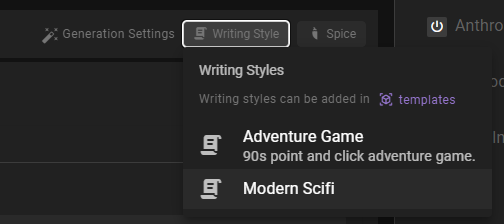

This will apply the writing style toi any content generations you do.
Next, click the Generate button bove the character description to generate a new description for the character using the selected writing style. (Hold alt if you want to do a rewrite of the existing content)
Editing a writing style template
To edit an existing template, select it from the list of templates in the left sidebar.
Then adjust any of the fields in the form that appears.
Updates are appied automatically and there is no need to manually save the template.
Deleting a writing style template
To delete a template, select it from the list of templates in the left sidebar, then click the Remove Template button.