Text Manipulation
Before the voice agent sends a piece of text to a TTS backend it emits an event carrying that text, and a node module listening for the event can rewrite it. The audio then follows the rewritten text while the message in the scene stays exactly as it is.
The common use is pronunciation: a name the backend mangles can be spelled phonetically for the voice only, without changing how it is written in the story. Expanding abbreviations or removing characters a backend stumbles over works the same way.
Creating the listener
Find the Create module menu, select Event and name the module Fix Pronunciation.
The event to listen for is agent.tts.generate.before, which is emitted once per chunk of text right before the audio for it is generated. Either set event_name on the module itself and enable auto_register, or add the module to the scene loop and set event_name there — see Events for the difference between the two.
Replacing text
In this example the backend mispronounces the name Kaira, so the voice gets a phonetic spelling of it.
Add these nodes to the module graph:
EventUnpack Generation EmissionReplaceMake BoolSet Chunk Text
Set them up:
Replace
| Property | Value |
|---|---|
| old | Kaira |
| new | Kyra |
Then connect them:
<Event>.event<Unpack Generation Emission>.emission<Unpack Generation Emission>.text<Replace>.string<Unpack Generation Emission>.emission<Set Chunk Text>.emission<Replace>.result<Set Chunk Text>.text<Make Bool>.value<Set Chunk Text>.state
Set Chunk Text writes to the chunk, so its state input gates the write and has to be connected — with nothing on it the node never runs. A Make Bool left at its default true simply says yes; put a switch there instead when the rewrite should only apply sometimes.
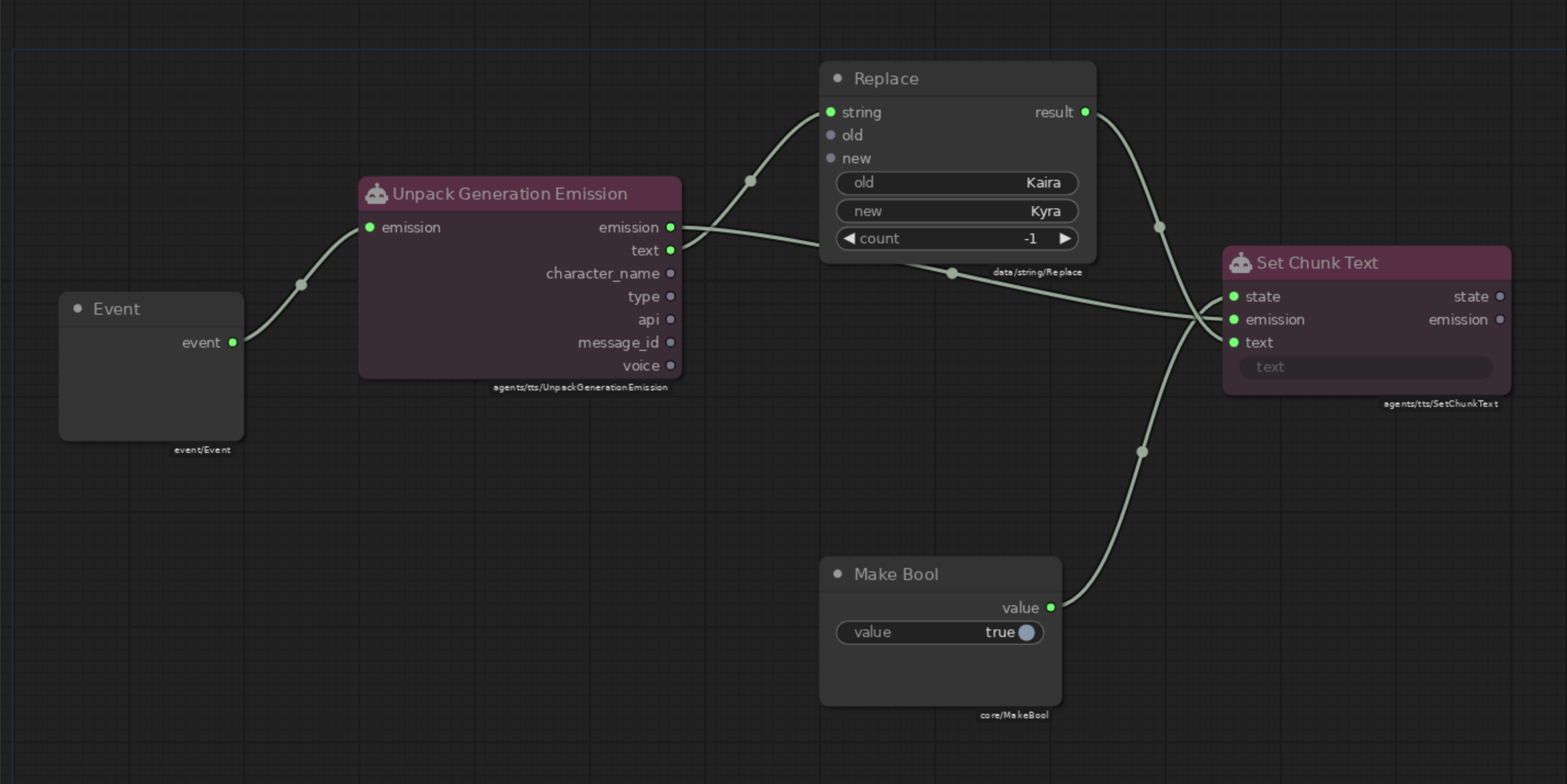
The finished module — the wiring from the steps above, with Replace set to Kaira → Kyra and a Make Bool feeding the state gate.
Save!
Save the module.
Unpack Generation Emission also exposes character_name, type (dialogue or exposition), api, message_id and voice, so the rewrite can be limited to a single character, to narration, or to one TTS backend.
The rewrite is still cleaned up
The new text passes through the standard chunk cleanup before it is sent: runs of two or more capitals are lowercased, emphasis characters (*, ", backticks) are stripped, —, … and ; are converted, and a period is appended when terminal punctuation is missing. A phonetic respelling like kuh-RYE-ruh is therefore spoken as kuh-rye-ruh.
Backend-specific preparation runs before agent.tts.generate.before, so it does not re-run on the rewritten text.
Empty text does not cancel generation
Set Chunk Text only changes what is spoken. Writing an empty string does not skip the chunk — it still reaches the backend, which produces no audio for it. The voice agent logs that chunk and skips it, and the rest of the queued audio still plays.
Prepending or appending text
The same chain works for text that is added instead of replaced. Swap the Replace node for a Jinja2 Format node — this one announces the speaker before every line of dialogue.
Jinja2 Format
| Property | Value |
|---|---|
| template | {% if character_name %}{{ character_name }} says: {% endif %}{{ text }} |
<Unpack Generation Emission>.text<Jinja2 Format>.item0<Unpack Generation Emission>.character_name<Jinja2 Format>.item1<Jinja2 Format>.result<Set Chunk Text>.text
Each dynamic input takes its variable name from the socket it is connected to, so the two outputs are available as {{ text }} and {{ character_name }} in the template. The event also fires for narration, which has no character name — the {% if %} guard leaves those chunks unchanged.
Which event to hook
Both agent.tts.prepare.before and agent.tts.generate.before carry the same emission, but rewrites belong on agent.tts.generate.before. The backend-specific preparation step runs after agent.tts.prepare.before and may rewrite the text itself, so a change made there can be overwritten again.
See the Events reference for the full payload of both events.