Template Overrides
A template override is your own copy of a default prompt template. Talemate uses the copy instead of the default wherever that template is rendered, for example to change how the narrator is asked to describe a scene. Overrides live in an editable template group: user, scene or a custom group. The priority order decides which copy wins when several groups have one.
Override a default template
Templates in the default group are read-only. To change one, make a copy in an editable group:
- Open Prompts → Template Files → Active and locate the template you want to customize.
- View its content in the default group.
- Switch to the target group tab, for example user.
- Create a new template with the same agent directory and filename.
- Paste and change the content.
To edit an existing override, open its group tab and select the file. The built-in editor opens with the full Jinja2 source. To go back to the default, click Reset to default: it removes your copy, and the confirmation names the source Talemate uses next (another active group's copy, or the default).
Templates are standard Jinja2 files with access to Talemate's template context variables and functions. The template function reference lists the functions.
Keep overrides current
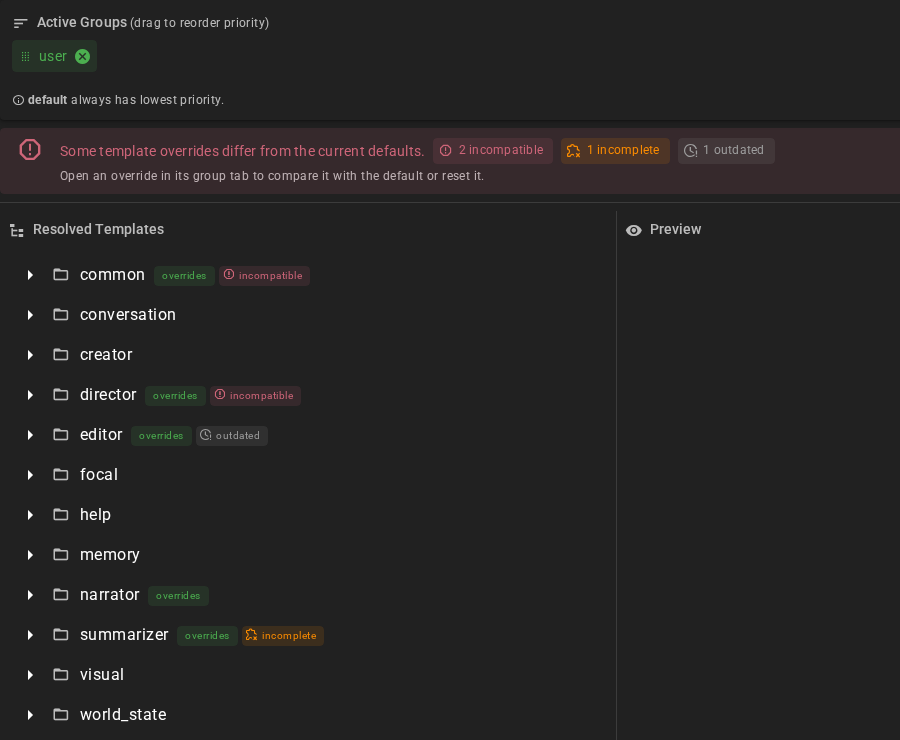
A new Talemate version can change a default template that you have overridden. Your copy keeps the old wording and misses the change. Talemate compares each override with the default it replaces and marks it with one of three states:
| State | What it means |
|---|---|
| outdated (grey, clock) | The file is older than the default. It may miss improvements, but nothing it depends on is gone. |
| incomplete (orange, puzzle piece) | The default includes a section or checks a setting that your copy does not. The feature behind it does not reach the model. |
| incompatible (red) | The default asks the model for a marker Talemate reads from the response, or makes a call Talemate requires, and your copy does not. Results from this template can come back empty or be rejected. A copy that defines its own extractor for that response field and asks for its marker is not flagged. |
For example, the summarizer's summarize-dialogue default includes audience-summary-instructions.jinja2 when a summary is written for one character's point of view. A copy made before that section existed is marked incomplete: its summaries ignore what that character could know. A guide-conversation copy that asks for GUIDANCE: instead of a <GUIDANCE> block is incompatible: Talemate cannot find the guidance in the answer.
The Prompts tab icon in the main navigation and the Active tab show the worst state among your active overrides, and the tree marks each template and its folders. Hover a state to see what is missing. The same list appears in the backend log at startup.
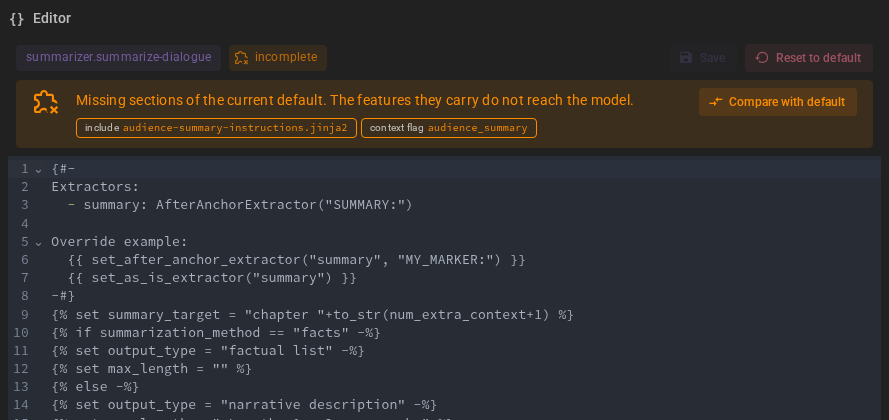
Open an override in its group tab to fix it. The editor names what is missing and offers two ways out:
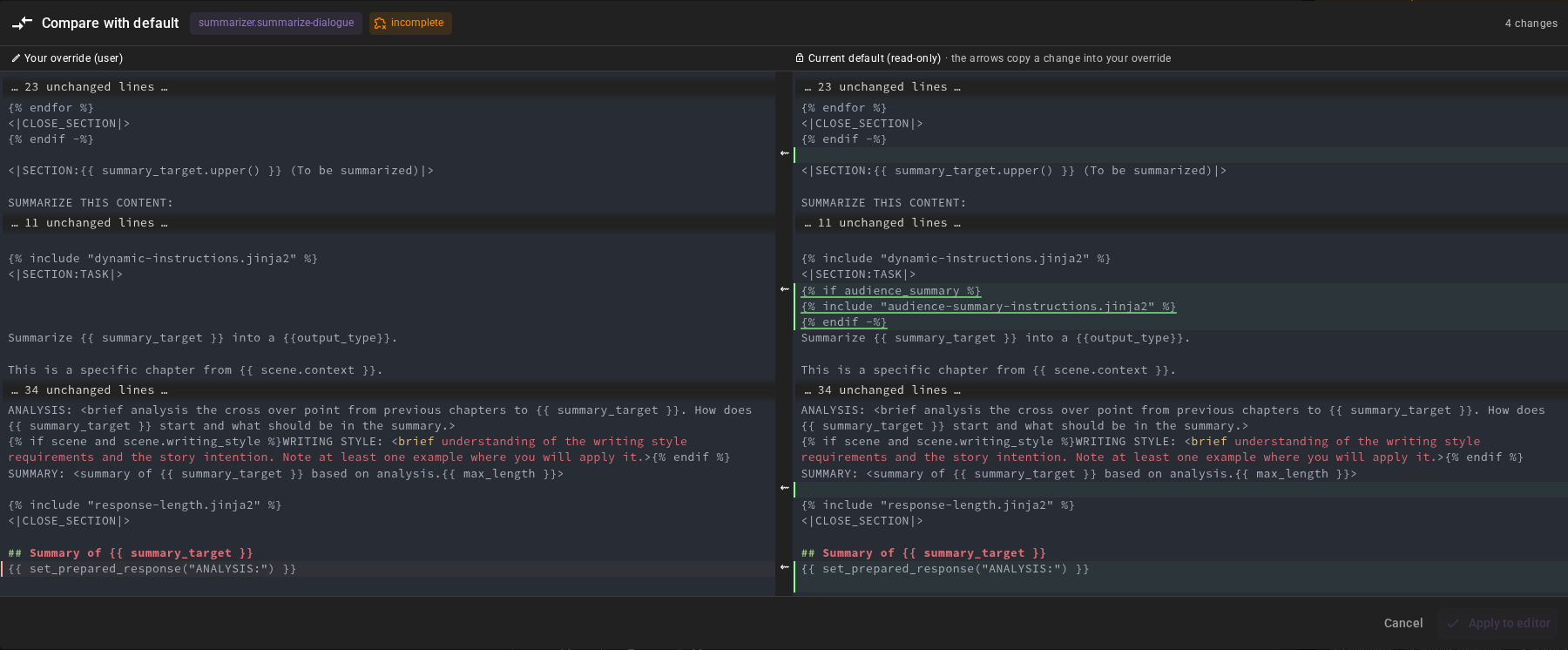
- Compare with default opens your copy beside the current default, with the differences highlighted and unchanged parts folded away. The arrows between the two sides copy a change from the default into your copy. Apply to editor puts the result in the editor; save it there to keep it. Compare is available for every override that has a default, whatever its state.
- Reset to default removes your copy.
If an override still produces an empty result while you play, Talemate shows a warning that names the template and the group it came from, for example when the override never asks the model for the marker the answer is read from. Each template warns once per session.
World snapshot overrides
World snapshot overrides must use snapshot_request.context_history(...) to supply their broad story history after memory retrieval. Older copies of world_state/request-world-state-v2.jinja2 that call only scene.context_history(...) cannot establish the inputs needed for safe snapshot regeneration. This also applies to world_state/add-snapshot-entity.jinja2 overrides. The Prompt Manager marks such a copy incompatible and lists the missing call as a required call.
Put the call after the memory retrieval and any other context that can run agent actions, and render the history it returns:
{% set background_history = snapshot_request.context_history(budget=background_budget) %}
{% for line in background_history %}
{{ line }}
{% endfor %}
The call records where the story history ended when it was read. If a message arrives during memory retrieval, it becomes part of the snapshot's source; if an earlier message is edited or deleted, the result is discarded. Do not replace the call with scene.context_history, and do not read the history before the memory retrieval.
If Talemate reports an incompatible snapshot prompt, open Template Files → Active in the Prompt Manager and locate the template named in the notice. Compare it with the current default and update your override, or delete the override to restore the default. An incompatible result is not applied; Talemate makes no automatic retry.
Decision policy overrides
When a decision model is set up, some features ask it a quick question before they make their usual request. Each of these features has a policy template you can override: world_state.decision-query, world_state.decision-pin-conditions, world_state.decision-reinforcement, world_state.decision-avatar, world_state.decision-background, world_state.decision-snapshot-references, memory.decision-entity-references and editor.decision-checks.
A policy says what it wants to know, in plain words, and what to do with the answer. Most overrides only change a question's wording or its threshold: how sure the model must be before its answer counts. For example, the yes/no query policy:
{% set threshold = 0.9 %}
{% set answers = ask("yes-no-query", state=state, questions={"query": yes_no(query, threshold=threshold)}) %}
{% set answer = answers.query %}
{{ note("fallback" if answer.uncertain else "answer", "uncertain" if answer.uncertain else "confident", answer) }}
{{ resolve(answers) }}
Lower the threshold to 0.75 and the model's answer is used whenever it is at least 75% sure. Below that, the usual request answers the question.
| Function | What it does |
|---|---|
yes_no(question, threshold=…) |
A yes/no question. true_criteria and false_criteria can say what counts as yes and as no. |
choice(question, options=…, none=…, threshold=…) |
Pick one of options (id to description). none describes choosing none of them; "none" cannot be an option id. |
ask(label, state=…, questions=…) |
Sends the questions with the text the model reads (state) and returns the answers by question id. The state a feature passes to its policy is shortened to the decision model's input limits for these questions; pass it on unchanged, as the default templates do. Questions that do not fit together are sent in several requests. |
note(action, reason, answer, …) |
Writes the line the Decision Log shows for this decision. Pass the answers it is based on and their probabilities and threshold are added; with several yes/no answers, each probability is listed under its question id. Answers passed together need different question ids, unless they are the same answer. |
resolve(answers) |
Finishes a policy: every answer that is none goes to the usual request. The answers must be exactly the ones the feature expects; if they are not, every one goes to the usual request. |
revise(findings), keep() |
Editor checks only: revise the text with these findings, or keep it unchanged. |
A yes/no answer has yes, no and uncertain, and value is true, false or none when the model was not sure enough. yes means the probability of yes reached the threshold, and no that the probability of no did; with a threshold of 0.5 or lower both can be true, and value is then true. A choice answer's value is the chosen option, or none when the model chose none of them or was not sure enough. Both have confidence, and a yes/no answer also has p_true, the probability of yes.
Read an answer as answers.query or answers["query"]. The bracket form always works; use it when a question id is also the name of something the answers already have, such as items, keys or values.
If your policy asks an extra question of its own, pass only the feature's answers to resolve, for example resolve({"query": answers.query}).
world_state.decision-avatar and world_state.decision-background share their logic in common/decision-visual-selection.jinja2. Override one of them to change its questions or threshold, or the shared template to change how both choose.
A policy that fails before it calls resolve, revise or keep, or never calls one, falls back to the usual request. After resolve has run, a later failure keeps the resolved answers; after revise, it keeps the original text and discards the revision. A failure after keep() still falls back to the usual request.