Overview
The help agent provides an interactive help chat that answers questions about Talemate itself - settings, agents, clients, the world editor, the node editor and everything else the application offers.
It grounds its answers in the documentation that ships with Talemate: it knows the documentation's sections and can look up relevant pages by topic, search the documentation, read whole pages, or read individual sections before answering.
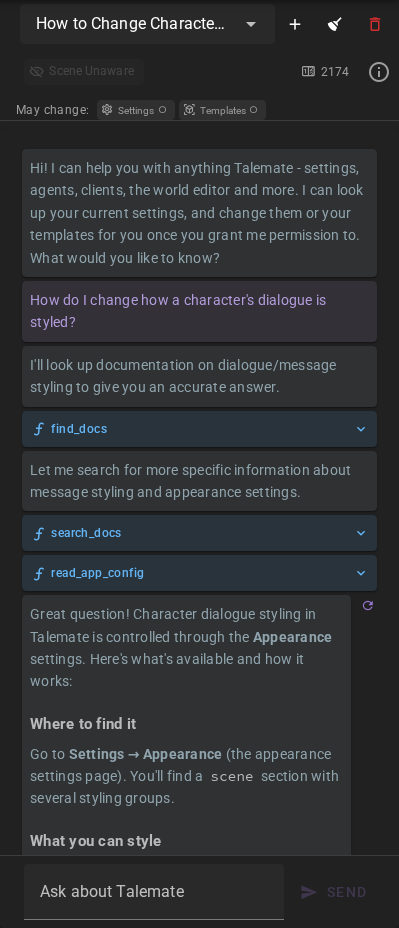
Open the help chat via the icon in the app bar. No scene needs to be loaded. The icon is only there while the Help agent is enabled - if you don't see it, enable the agent under Settings → Connections → Agents → Help.
What it can and cannot do
- It answers questions and points you to the relevant documentation pages.
- Its answers can include links that navigate you inside the application - to an agent's settings, a world editor tab, or the director console.
- It can read your configuration, and - once you grant the permission - change settings for you; see Reading and changing settings below.
- It can build and change themes for you - see Themes below.
- It can build and change your other world state templates too.
- It cannot change anything in your scene itself - its story, characters or world state. If you want to make changes to a scene through chat, use the director's chat instead. For questions about your scene's content the director chat is also the better place - the help agent only sees a shallow snapshot of the scene, the director has the full context.
Permissions
Everything the help agent can read is available to it out of the box. Everything it can change is off until you turn it on, under Settings → Connections → Agents → Help → Permissions:
| Permission | What it hands over | Default |
|---|---|---|
| Allow changes to settings | Changing your application and agent settings from the chat | Off |
| Allow changes to templates | Creating and changing world state templates and themes | Off |
| Both together | Applying a theme — it writes the message styling and the active theme into your appearance settings as well as reading a template, so it answers to both | Off |
Use a strong agentic reasoning model
These permissions let an LLM write real changes to your configuration and templates on its own. A strong agentic reasoning model is highly recommended before you turn one on — weaker models misread what you asked for and make destructive or unwanted changes. Leave them off if the help agent runs on a small or non-reasoning client.
The help chat carries the same two switches: a May change row above the conversation shows a chip per permission, green with a checkmark when it is granted and muted when it is not, and clicking one grants or revokes it on the spot. While either is granted, a single line under the chips repeats the recommendation below.
With a permission off, the matching tools are not merely refused when called — they are never handed to the agent at all, so there is nothing for it to misuse and nothing about them in its prompt. Ask it for a change anyway and it reads the current value, tells you where to make it yourself, and points you at the permission that would let it do the work. It cannot turn its own permissions on: that stays yours.
Reading and changing settings
The help agent can see what you currently have configured, so instead of answering from the documentation alone it can tell you what a setting is set to and what your options are. It can look at:
- Any agent's settings - every action and setting with its current value, small choice lists, and any per-scene overrides. Model choices, provider lists and other long choice lists stay in the settings dropdowns.
- Application settings - the game (general), appearance, creator, inference/embeddings presets, and prompt template group sections of your config.
- Your configured clients - type, model, context length and status.
When the Allow changes to settings permission is on, it can also change settings:
- Agent settings, either globally or as a per-scene override for the currently loaded scene - it can also remove a scene override so the setting falls back to the global value again.
- Application settings in the game, appearance, and creator sections.
- Inference parameters for one action preset or every preset in an existing inference group, including advanced sampling and stopping strings.
So things like "switch the scene context format to Narrative", "lower the editor revision to only run on dialogue", "turn off auto save" or "override the visualizer style for this scene only" can be done right from the chat. Changes are applied immediately, the tool result records the applied values, and an open settings view picks them up live.
If an agent cannot apply a saved change, Help reports that it was saved but is not yet applied. Settings shows Apply pending — press Save to retry and keeps Save available without further edits. After correcting the cause, press Save or ask Help to set that setting again. The failed agent retries its rebuild even when the saved value is unchanged. Other agents are not forced to rebuild because one failed. The same retry behavior applies to failed saves from Settings.
Choosing a model
Choose the model yourself in the settings dropdown, then give Help its exact id. Help does not list or recommend models. For an OpenRouter model, it checks that id and reports the model's listed input and output capabilities before changing your agent setting. This check does not send a generation request. If OpenRouter cannot be reached, Help reports that it could not verify the id.
Inference presets
Name the group and the action preset you want to change, or explicitly ask for all presets in that group. For example:
Set all presets in my Qwen 3.8 group to temperature 1.0, top_p 0.95, top_k 20, min_p 0.0, and the rest at defaults.
An ordinary update leaves other parameters alone. The rest at defaults resets unspecified parameters to each selected action preset's own application defaults, so analytical and creative presets can retain different default values. Help does not invent model-specific defaults. It reads the target and valid parameters, announces the scope and reset intent, then applies the change under your settings permission. There is no separate approval dialog for each write.
Help can inspect defaults and edit the same parameter types, ranges and steps as the preset editor. It asks for clarification when the group or preset is unclear; it cannot create, delete or rename groups. Client support still varies: saving a parameter does not make a client support it. Applied values appear in Settings and the pinned inference editor and are saved for reopening. A save failure is reported as unconfirmed persistence, even if values changed in memory.
Focused configuration reads
Help can inspect a single nested setting, preset or group without bringing unrelated configuration into the chat. Large reads return a compact index with follow-up navigation; larger individual values can be retrieved in full through explicit chunks. An index is a list of available entries, not a claim that omitted values are missing or at defaults. API keys and passwords remain hidden throughout.
Ask for all the relevant entries when that is what you need. The agent can make further tool calls to retrieve them. If it reaches its configured tool call round limit, it must say what remains unread; you can ask it to continue or increase that limit.
Some things are intentionally out of reach:
- API keys and passwords are never shown to the help agent and it cannot change them - key management stays in the application settings (Connections → API Keys).
- Clients are read-only - client changes (model, context length, etc.) must be made in the client settings.
- Complex settings (tables, weight maps, template pickers) are read-only in chat and must be edited in the settings interface directly.
Unsaved settings edits
Having the Settings tab open is fine - applied changes show up there live. But while the settings view holds unsaved edits, the help agent refuses to change anything - agent settings and application settings alike - and asks you to save or discard them first. That view edits a working copy of your whole configuration and saves all of it at once, so its Save would push the pre-change values back over whatever the agent just wrote for you. Which page you happen to be on makes no difference.
Unsaved edits stay pending when you switch to another main tab, and so does the refusal. Save or discard them, then ask again.
World state templates
With the Allow changes to templates permission on, the help agent can work on world state templates - character attributes and details, spice collections, writing styles, state reinforcements, scene types, scene tool shortcuts, visual styles, visual prompt finalizers and agent personas. Ask for one in the chat and you get a real template that shows up in the Templates tab:
- "Make me a character attribute template for a character's fighting style"
- "Add a state reinforcement that tracks where everyone is, checked every five turns"
- "Copy the shipped Physical Traits attribute into my own group and make it shorter"
It can list your templates, describe what a type of template carries before it writes one, read one in full, create one, and change the fields of one you own. A template it creates goes into a template group you name, creating the group if it does not exist yet.
Before it writes a type it has not touched in that chat, it asks the application what that type carries: the field names, their types, their defaults and their valid values come from the same models the save path validates against, so what it writes is what the Templates tab would have written. A field it does not set keeps the default it would have had there.
What it will not do:
- Apply or install a template. Applying a character attribute, a character detail or a state reinforcement writes into your scene, and the help agent does not change scenes. Applying stays yours, in the Templates tab and the world editor.
- Delete a template. That stays in the Templates tab too - select the template and click Remove template.
- Edit a template that ships with Talemate. The groups Talemate ships are read-only to the agent, and so is any template marked locked; it offers to copy one into a group of your own instead.
- Write a state reinforcement with auto-create on while a scene is loaded. Saving such a template applies it to the characters of the loaded scene right away, which is a change to your scene — and it happens on every save, so a template that already has auto-create on cannot be changed through the chat while a scene is loaded either: re-applying it would blank the answers it has collected. The agent says so and sends you to the Templates tab, or offers to make the change with no scene loaded. Turning auto-create off is always allowed, and a state reinforcement whose state type is World is never affected, since it applies to no character.
Unsaved edits in the Templates tab
The same rule as for settings and themes applies: while the Templates tab holds an unsaved template edit, the agent refuses to write and asks you to let that edit save first. The tab saves the whole template it is on, so its save would overwrite what the agent wrote.
The refusal is decided from what the tab reported when you sent the message, so a write can still land while you are typing. If it does, the editor shows a warning above the form saying the template was changed elsewhere — your unsaved edits win when they save, so redo the change you asked for if you still want it.
Themes are templates too, but they have their own tools - see below.
Themes
The same permission covers themes, the templates that hold Talemate's colors. Applying one additionally needs Allow changes to settings, since it writes the theme's message styling and the active theme into your appearance settings. Ask for a theme in the chat and you get a real theme template you can apply from Appearance → Theme:
- "Create a solarized dark theme for me"
- "Make the narrator text in my theme a bit greener"
- "Copy Talemate Dark into my own group and give it a warmer background"
It can list your themes, read one in full, create one, change the colors, message styling, mode and code editor scheme of one you own, and apply a theme so the app repaints immediately.
A theme it creates is always complete: every one of the 51 color slots is taken from another theme first — the one you are running unless you name a different one — and only what you asked about is changed on top. It goes into a template group you name, creating the group if it does not exist yet; without a preference it uses one called My Themes.
How it judges colors
The agent cannot see the theme it is writing, so what can be computed is handed to it. Reading a theme reports, per slot:
- A rough name for the color, such as "muted dark blue" or "vivid red", so it can tell a slate blue from a bright one and notice when two slots hold the same family.
- The contrast between that color and the fill it is drawn on, as a WCAG ratio. Four of the theme's own fills carry content — the page background, the card surface, the toolbar band, and the tooltip fill for its own label — and the reported number is the worst of the ones that slot is drawn on, with that fill named. The band only counts for the slots the interface really puts on one. The ratio is arithmetic between two colors of your theme, truncated down to two decimals.
- The reference WCAG asks of what that slot paints: 4.5:1 where the slot paints text, 3:1 where it paints chips, icons and other interface marks.
What the theme does not know is where a slot is really drawn — that lives in the interface code, not in the palette. Where a slot is known to be drawn somewhere else, it is reported as unmeasured with the reason instead of being given a number: the muted color is dimmed by opacity before it is drawn, code spans sit on the toolbar fill, the asset badge fills with its color and puts a white label on top, and the chat bubbles tint themselves with their own color. The agent is told that unmeasured means unknown rather than fine.
Nothing in the result decides whether a slot passes. It reports the measurement and the reference and leaves the judgement to the agent, which names what falls under the reference after every change so you hear about a hard-to-read color in the same conversation. The shipped themes are not exempt: Talemate Dark reports four — its brackets markup at 4.42:1, its primary at 4.37:1 and its error at 4.47:1, all near-misses on text, and its delete at 3.23:1, which is not — and Talemate Light reports eight accents that measure between 3.73:1 and 4.06:1 on the toolbar band, where its Save button label is drawn.
What it will not do:
- Edit a theme that ships with Talemate. Talemate Dark and Talemate Light are locked; the agent offers to copy one into a group of your own instead.
- Delete a theme. That stays in the Templates tab — select the theme and click Remove template.
A color you set by hand on the Appearance → Messages page keeps overriding the theme, so a theme change you cannot see is usually that override. The agent can read your appearance settings and clear the override for you if you ask.
One more thing changes only on apply: the message styling — italic, bold, visibility, own color and the backdrop settings. Colors, mode and the code editor scheme of the theme you are running repaint the app the moment the agent writes them, but styling is read from your appearance settings, which a theme writes only when it is applied. The agent says so instead of claiming a change you cannot see.
Unsaved edits in the Templates tab
The same rule as for settings applies: while the Templates tab holds an unsaved theme edit — an open color picker, a notes field you have not left — the agent refuses to write a theme and asks you to let that edit save first. The tab saves the whole template it is on, so its save would overwrite what the agent wrote.
The refusal is decided from what the tab reported when you sent the message, so a write can still land while you are typing. If it does, the editor shows a warning above the form saying the template was changed elsewhere — your unsaved edits win when they save, so redo the change you asked for if you still want it.
Chats
Help conversations are multi-turn and you can keep several of them - use the chat selector at the top of the help drawer to switch, create, or delete chats. Chats persist across restarts (they are stored in chats/help.json in your Talemate directory, independent of any scene).
The most recent answer can be regenerated via the refresh button next to the message.
Scene awareness
Each chat has a Scene Aware toggle. When enabled and a scene is loaded, the help agent can see the scene title, its characters, and recent scene progress, so you can ask scene-specific questions. When disabled the conversation is completely unaware of your scene.
The help agent also receives a small snapshot of what you are currently looking at in the interface - the active tab, which drawers you have open, whether a scene is loaded and what it is doing, the state of the settings view (the page you are on, whether it has unsaved edits, and which client or agent you have selected there - for an agent, also whether it is in Global or Scene mode), and the state of the Templates tab (the template you have selected and whether it has unsaved edits). So questions like "what does this setting do?" can be answered in context.
Non-blocking
Help chat generation runs in the background and does not block the main Talemate loop - you can keep playing a scene while a help response is being generated. If your connected client does not support concurrent requests, the requests will naturally queue up against each other.