Settings
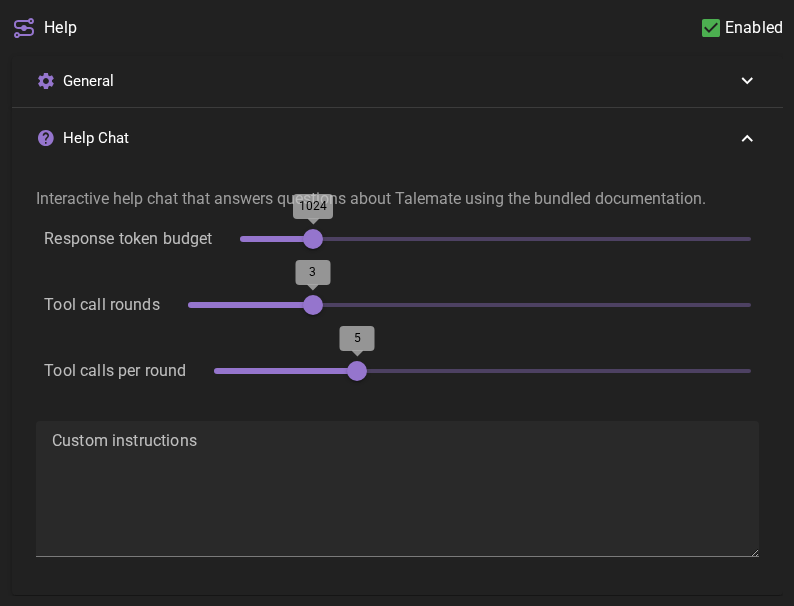
Response token budget
Maximum response length for help responses.
Tool call rounds
How many rounds of tool calls (documentation lookups, settings, theme and template reads and updates) the help agent may perform before it must answer. Each round lets the agent use its tools and then continue with the results in context.
Help keeps your current request and prioritizes the newest write result before fitting recent reads into the remaining history budget. A notice names any tool results omitted from the current turn and tells Help not to repeat those calls or claim their outcomes. If no result has been kept yet, an oversized result may get a labelled preview when space permits. The saved chat retains the full results. Even with no history budget, the request and omission notice remain; increase the client's context length if Help needs the missing results.
Tool calls per round
Maximum tool calls per round. When the connected client supports concurrent inference, the read-only calls in a round execute concurrently; settings, theme and template changes always run one at a time.
Custom instructions
Extra instructions added to every help chat prompt.
Permissions
What the help chat is allowed to change. Reading is always available; both permissions are off by default. You can toggle them here or from the chips above the help chat itself — what the agent cannot do is grant them to itself.
Allow changes to settings
Lets the help chat change your application and agent settings, including inference preset parameters, when you ask it to. With it off, the setting-writing tools are not handed to the agent at all — it reads the setting and walks you through the change instead.
Allow changes to templates
Lets the help chat create and change world state templates, themes included. With it off, the template-writing tools are not handed to the agent at all.
Applying a theme is the one action that answers to both permissions: it replaces the message and markup styling in your appearance settings — italic, bold, visibility, own-color, and the backdrop's opacity and text shadow — and switches the active theme, so the agent gets it only when Allow changes to settings is on too. A color you set by hand under Appearance → Messages survives and keeps overriding the theme; clearing those is what Restore from theme is for.
Use a strong agentic reasoning model
Both permissions let an LLM write real changes on its own. A strong agentic reasoning model is highly recommended before turning one on — weaker models make destructive or unwanted changes.
Configuration lookup tools
read_agent_settings retains current values and scene overrides, but omits model
choices, provider filters and choice lists longer than 20 entries or 2,048 UTF-8
bytes. It directs the user to choose an id or value in the settings dropdown.
validate_openrouter_model checks one user-supplied model_id and returns
existence and reported input/output modalities, with image reference limits and
formats when available. It never returns a model list or recommendations. An
unavailable lookup returns unknown, not a missing-model verdict.
read_app_config reads game, appearance, creator, presets and prompts.
Omitting section lists those sections. Results are limited to 8,192 UTF-8 bytes
when rendered as the tool's indented JSON. Small reads return exact values;
large reads return navigation metadata instead of silently truncated values.
| Argument | Meaning |
|---|---|
path |
List of exact keys or array indexes relative to the section, such as ["inference_groups", "Qwen 3.8", "presets", "analytical"]. A dotted group name stays one list element. |
fields |
Optional list of existing fields of the selected object, such as ["temperature", "top_k"]. |
mode |
auto returns small values in full; index lists keys and types; value returns serialized JSON chunks. |
limit |
Entries per index page: 1–100, default 20. |
offset |
Start at 0, then use next.offset; index offsets count entries, value offsets count characters of serialized JSON. |
revision |
Copy next.revision on follow-ups to detect a changed value. Revisions and chunk offsets use the same canonical JSON with sorted object keys, so insertion-order changes do not mix representations. Restart at offset 0 without revision if it changed. |
Keep section, path and fields unchanged while following next. Index
entries expose keys to append to path for detail. complete on an index means
the index's last page, not that entry values were included. For mode=value,
concatenate chunk strings from offset 0 until next is null, then decode the
JSON to recover the original types and values. This also handles oversized
individual strings and object keys. Every path uses the same redaction rules.
describe_inference_parameters exposes supported parameter names, types, ranges,
steps and the paths to each action preset's defaults. With settings permission,
update_inference_presets accepts an existing group, a preset key or all,
and a parameters object. Set group_is_key=true to select the exact, case-sensitive
key returned by the group index, without matching display names. The default name
lookup refuses ambiguity; clarify the intended group before choosing its key.
The empty key means built-in Default, while a named Default group uses its own
nonempty key with group_is_key=true. reset_rest=true
resets each selected row to its own defaults before applying the supplied values;
the default false preserves unspecified parameters. It does not grant arbitrary
configuration writes. A result with applied=false is not a successful save.
Prompt caching
Help keeps its tool descriptions before changing chat/view context, including the final tool-result continuation. Current permissions and scene/view context still reach each request. This preserves reusable prefixes without extra model requests. Cache reuse also depends on the provider's cache settings, minimum prefix length, routing and expiry. Inspect backend cache usage to establish hits; a stable prompt or a shorter response alone is not evidence of reuse.