Knowledge
The World State panel offers a knowledge hub on every character row: the character’s disclosures or access rules, the Character perspectives switch, and the agent settings that shape knowledge keeping, without leaving the main view. The sections below describe the settings themselves. Character knowledge: flow reference shows the flow behind them, with diagrams.
Choosing a mode
Every story runs in one of two character knowledge modes. You choose when you create the story, in the Create New Story dialog or in a character card import. The choice stays open in Scene Settings while the scene has no history, and locks once history exists. Both dialogs let you compare the modes before choosing.
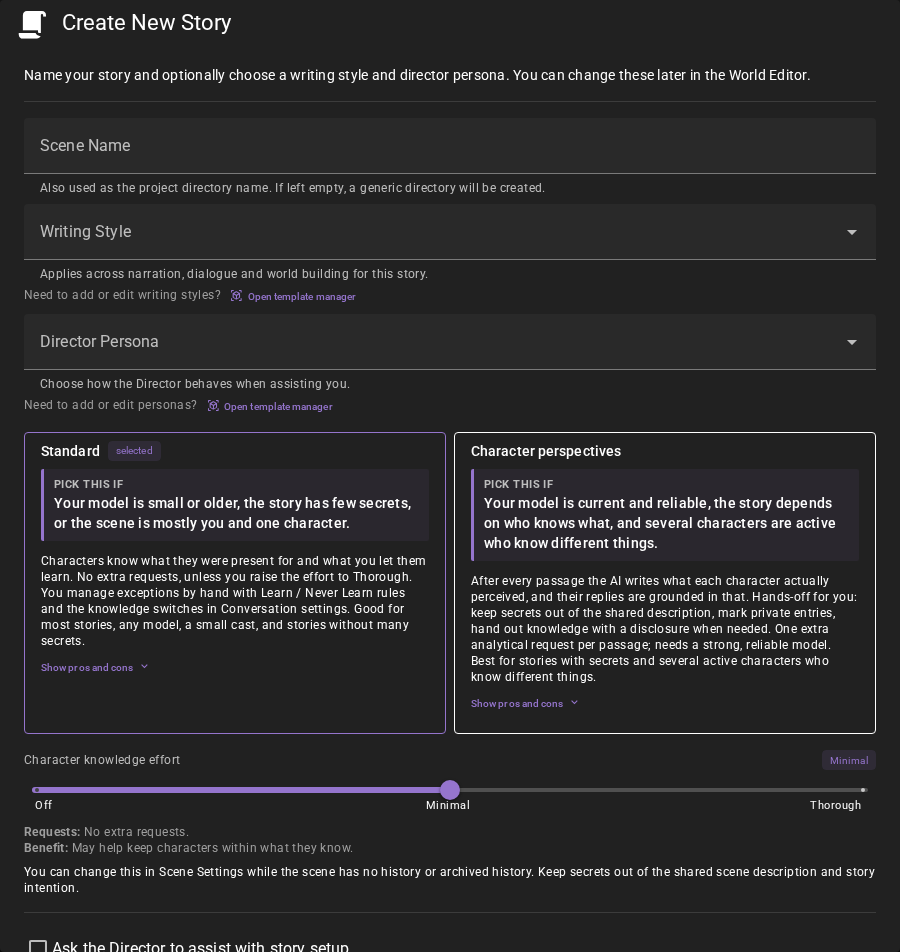
Standard — Characters know what they were present for and what you let them learn. No extra requests, unless you raise the effort to Thorough. You manage exceptions by hand with Learn / Never Learn rules and the knowledge switches in Conversation settings. Good for most stories, any model, a small cast, and stories without many secrets.
- Pros:
- No extra requests, unless you raise the effort to Thorough
- Works with any model
- Nothing is locked in
- You control exceptions directly with Learn / Never Learn rules
- Cons:
- A present character sees the full reader prose, private thoughts included
- Leaks are yours to catch and fix by hand
- Pick this if: Your model is small or older, the story has few secrets, or the scene is mostly you and one character.
Character perspectives — Before each generation the AI writes what each character actually perceived of the new passages, and their replies are grounded in that. Hands-off for you: keep secrets out of the shared description, mark private entries, hand out knowledge with a disclosure when needed. One extra analytical request per passage; needs a strong, reliable model. Best for stories with secrets and several active characters who know different things. Cannot be changed once the story has history.
- Pros:
- Characters only know what they actually perceived
- Secrets hold without hand-tuning
- Hands-off once set up
- Disclosures give exact control when needed
- Cons:
- One extra analytical request per passage (slower, costs more)
- Needs a strong, reliable model, or analyses fail and pause generation
- Cannot be turned off once the story has history
- Cannot revoke knowledge a character already perceived
- Pick this if: Your model is current and reliable, the story depends on who knows what, and several characters are active who know different things.
| Pick this if | Standard | Character perspectives |
|---|---|---|
| Your model | is small or older, or you want any model to work | is current and reliable; see Model expectations for what that means |
| Your story | has few secrets | depends on who knows what |
| Your workflow | you manage exceptions by hand with Learn / Never Learn rules | hands-off once set up, with disclosures when needed |
| Your cast | is mostly you and one character | has several active characters who know different things |
Effort presets
The Character knowledge effort slider sets the knowledge options together. Find it in the knowledge hub’s Thoroughness section — including the hub the optional scene header chip opens — the Create New Story and character-card import dialogs, or Conversation’s Character Knowledge settings. Its explanation separates normal requests, conditional retries and potential benefit. Changing individual settings can make the slider show Custom; selecting a stop applies that row.
Create New Story and Character Card Import default to Minimal in Standard mode and Balanced in Character perspectives mode. These choices become scene overrides before knowledge work starts, including values equal to global settings. Global settings stay unchanged. The import slider controls ongoing story knowledge separately from import generation options. Use global settings in the knowledge hub restores inheritance.
Standard (three stops):
| Stop | Toggles | Extra requests | Model |
|---|---|---|---|
| Off | Character Knowledge off; inactive subsettings stay as they are | None | Works with any model. |
| Minimal (creation default) | Character Knowledge on, Limit to character knowledge on, Refine memories with AI off | None | Works with any model. |
| Thorough | Minimal + Refine memories with AI | One before a generated reply with uncached retrieved memories | Needs a current reasoning-class model; small or older local models will produce failed analyses. |
Off gives every character the full scene history. It is on the Standard track only; carrying Off across to Character perspectives lands on Minimal. Character perspectives always builds character views. Minimal and Thorough carry unchanged between modes; Character perspectives Balanced carries to Standard Minimal.
Character perspectives (three stops):
| Stop | Toggles | Extra requests | Model |
|---|---|---|---|
| Minimal | Character Knowledge on; required perception and audience-summary requests; Automatically repair analysis off, Refine memories with AI off | Required analysis and audience summaries | Needs reliable structured output (JSON / function calls): most current hosted models and strong local models. |
| Balanced (creation default) | Minimal + Automatically repair analysis | Required requests, plus a repair for missing or invalid views | Needs reliable structured output (JSON / function calls): most current hosted models and strong local models. |
| Thorough | Balanced + Refine memories with AI | Required requests, repairs, one before a generated reply with uncached retrieved memories | Needs a current reasoning-class model; small or older local models will produce failed analyses. |
Counts exclude provider and network retries. Character perspectives makes one analysis request per passage with an audience that needs analysis, covering those characters together. Speakers keep their own character messages verbatim. Player analysis is off by default; Analyze player perspective enables it independently of effort. Automatic repair can add one request for missing or invalid views. Summary requests depend on distinct character views and summary chunks. Memory refinement skips empty retrievals and reuses cached results. Character return transitions add no request at any setting.
What an existing scene loads with
A scene saved before this release loads in Standard mode. Its effort is not stored with the scene: the slider reads the global Conversation, Summarizer and Memory settings, unless the scene carries an agent override for one of them.
Changes made through the knowledge hub are scene overrides stored in the project's agent-settings file. Global agent settings are left untouched. Overrides are project-scoped and shared across every save in the project, including stock scenes, Save As copies and restore points. A stock scene's read-only protection applies to its scene save, not to the project's overrides: hub edits apply directly without a Save Scene dialog. Saves auto-link the project's default settings file on load, so loading the stock scene again picks up those changes too. A scene explicitly linked to a different settings file, or opted out of overrides, follows that choice; Per-Scene Agent Overrides explains these options. The Settings → Connections → Agents page remains the place to change the globals. The hub marks each value that comes from a scene override and offers Use global settings on a group header and above the effort slider; a reset removes only the knowledge settings the hub owns — including ones the current mode hides — and leaves every unrelated override in place. The effort chip above the slider says Global settings when none of the current mode's effort settings is overridden and Scene override when any is, and its tooltip tells a scene that supplies every effort setting from one that mixes scene overrides with globals. When a story has no save file, changing a hub setting opens Save Scene and continues the pending change after saving succeeds. Cancelling or a failed save preserves the change and entered name; see first-save continuation, retry and discard.
To get the behaviour Talemate had before character knowledge, drag the slider to Off, its first stop. The slider is in the knowledge hub's Thoroughness section, in the Create New Story dialog and in the Conversation agent's Character Knowledge settings. Off writes only the Character Knowledge switch. The switches under that master keep the values they held, because a master that is off makes every one of them inert; turning the master back on by hand brings those values back, and the slider reads the stop they match, or Custom when they match none.
The rest of this page is the reference for both modes.
Character perspectives (opt-in)
When creating a New Story or importing a character card, enable Character perspectives to give each character their own view of events. Turn it on to keep replies grounded in what that character has learned. The choice is off by default; with it off, the story uses Standard mode, where knowledge follows presence, ownership and sharing. The choice applies before initialization; cancelling an import or opening another one resets it.
You can also turn the mode on or off in World Editor → Scene → Settings while the scene has no history and no archived history. An intro, characters and world entries do not lock the choice. Save the scene to persist a settings change. Once history exists, the switch is disabled and the current mode is explained below it. The server also refuses changes if history appeared since the settings were displayed.
Saves, reloads and forks preserve the mode. Scene → Shared World → New Scene inherits it for the next episode. Stories with history cannot be converted by resaving, resetting or forking; past perceptions are not reconstructed. Turning Character perspectives off on an empty scene clears its stored perspectives and disclosures, along with the derived audience memory index. Turning it back on does not restore those records.
Predefined static history also keeps the mode locked.
The reader keeps the complete prose. Characters receive stored replacement views of passages, audience summaries, disclosures and accessible memories. Missing or failed views never substitute the reader's private text. Narration and author planning can retain broader reader context; character guidance and analysis use the character evidence appropriate to their task.
Cost and recovery
The Summarizer runs one analytical request for a finalized passage when at least one audience needs analysis. Speakers keep their own character messages verbatim, and players receive full passages unless Analyze player perspective is on. With one player and one NPC at defaults, an NPC line needs no request and a narrator passage analyzes only the NPC. Enable player analysis in Settings → Agents → Summarizer → Character Perspectives or the knowledge hub’s individual settings; effort presets do not change it. Investigations and changed tracker answers also use this analysis, including trackers that never insert a history message. Repeating an unchanged tracker answer reuses its source. Audience summaries add requests as material is summarized or rebuilt. Refine memories with AI remains a separate optional request before a generated character reply that has retrieved memories.
While analysis runs, dependent character generation waits. Self-citations are ignored, and correctly typed unoffered IDs are dropped with diagnostic warnings; neither discards valid character views. Missing or non-array citation fields and wrongly typed IDs invalidate the affected view and require repair. So does a view whose text does not match the parts the Summarizer listed as imperceptible for that character (see View a character's perspective). If a character view is missing or invalid, the Summarizer can try once to repair it, keeping valid views. Automatically repair analysis under the Summarizer’s Character Perspectives settings controls this extra attempt and is on by default. With automatic repair off, an unreadable citation field stops the passage and shows the generation error dialog. If analysis still fails, the generation error dialog shows the reason and offers Retry. Cancel or Ignore stops the dependent generation without falling back to reader text. The passage then counts as out of sync; correct the source or client configuration and choose Repair. Edits flag the views built on them as out of sync; stale in-flight results cannot replace the edited source.
Perception uses the generating model's common-sense interpretation, not a proof of what a character understands. It must not invent an observation or event to justify knowledge. Clean inputs do not guarantee that a model will never invent an action, explanation or lucky guess.
When perspectives go out of sync
Talemate analyzes new passages on its own, before each generation. A reply you regenerate or continue counts as a new passage too. Talemate never repeats an analysis on its own. When you edit, delete or browse a message, change who was present, or edit a summary, the perspectives and character summaries built on it are flagged as out of sync. They keep their last text, and generation keeps using it, so the story goes on with what the characters last knew. New passages are analyzed with that last known knowledge as well, so they can be out of sync from the start, and the count can grow until you repair.
The bar above the message input shows how many pieces are out of sync as one control beside View Perspective: the count, for example 3 out of sync, with a Repair button on its right. The tooltip of the count lists the passages and the character summaries per summary layer. Nothing is shown while everything is in sync. In the perspective panel, an out-of-sync view is marked as such.

Choose Repair to bring everything up to date. While it runs, the control reads Repairing and the button is gone. Repair runs one step at a time, with progress in the status bar:
- It analyzes the out-of-sync passages again, in story order.
- It rebuilds the character summaries, the base summaries first, then each summary layer.
A new analysis can change what later perspectives were built on. Repair redoes those too in the same run, so the count can go up for a moment while it runs. Each analysis is one request, and each character summary is one request per character, per chunk on the higher layers. With Automatically repair analysis on, an analysis can make one more request to fix a view.
Stop ends the Repair. What is done stays done, and everything else stays out of sync until the next Repair. If an analysis fails during a Repair, the error dialog offers Retry; Ignore leaves that passage out of sync and the Repair goes on without asking about it again, Cancel ends the Repair. Outside a Repair, a failed analysis of a new passage stops the generation; the passage keeps its last perspective, or has none, and waits for Repair. The next turn does not try it again. Pressing Stop is not a failure: a new passage you stopped is analyzed with the next turn.
To bring a single edited message up to date, use Analyze perceptions in its version bar (see Message revision history). It analyzes that passage only; what was built on it stays out of sync for Repair.
Say you edit an early message in a long story. The bar shows 6 out of sync: 2 passages and 4 character summaries for Mara and Edwin. The next replies still use the old perspectives. When you choose Repair, the 2 passages are analyzed first, then the 4 summaries are rebuilt, and the count goes back to zero.
Author responsibilities
Keep secrets out of scene description, story intention and current scene intention. The scene description remains a shared authoring input in dialogue and guidance; story and current scene intention reach perception analysis as well. Set visibility on character sheets, details and world entries yourself or through the director. Do not put private instructions into a character's shared description and expect perception to remove them.
In Character perspectives mode, separate character views replace Limit to character knowledge. Never Learn is not available for perceived knowledge, and there is no forget operation. Restricting an authored entry is not erasure of an already acquired disclosure.
See and edit what a character noticed
In a Character perspectives story the View Perspective chip above the scene tools splits the scene in two and shows, beside each message, what one character noticed of it. You can change a perspective there with a double click. See View a character's perspective.
Scene introductions
The introduction belongs to the characters active when it is established. A character activated later does not receive it in their filtered history, analysis or memories. The original audience stays attached to the introduction through saves and character renames; replacing the introduction records the currently active characters as its new audience.
In Character perspectives mode, that audience shares the same opening text. Talemate does not generate separate intro perspectives or make an extra AI request. The reader/player display retains the introduction. Shared author-facing history inserts a separate introduction only when no summaries or dialogue expanded from them are selected.
For a scene saved before introduction audiences existed, loading derives the audience once from the first narrative message's recorded presence. If that message has no presence record, or there is no narrative history, it uses the restored active roster. The result is saved with the scene, including an explicitly empty audience. This is a load convention, not a reconstruction of who actually witnessed an older opening.
If the first summary's audience includes someone outside the opening audience, the introduction stays separate from that summary. Characters can still receive their own dialogue and summaries without acquiring the opening.
Character activation and return
In Character perspectives mode, activating or returning a character does not start analysis of the passages they missed. If Alice and Bob talked while Carol was away, Carol's missing views of those passages are omitted without a request. New passages record Carol as present and get her perspective normally. Current stored views are kept. If a stored view for an absent character is incomplete or out of date, it is omitted until a current view is available; it does not block generation. A passage with no presence record requires no new views and does not hold up character summaries; mentioning a character's name does not establish that they were there.
Scene history marks each time an existing character is called into the scene or taken out of it, for example from the World panel or the World Editor. Calling them in adds a chip labelled [Name] activated in the character's color; taking them out adds a [Name] deactivated chip. A character that is created in the scene, or that is already present when a scene loads, gets no [Name] activated chip. One exception: when the Director creates a character who has not arrived yet, a [Name] deactivated chip appears at creation. The chips appear in every scene, with or without Character Knowledge. They have no delete button; removing the character from the scene removes their chips.
Click an activated chip to see a short summary: First time in the scene, or Back after 2 days away, and who was present at entry. Click the chip again to close it. A deactivated chip has no details.
When transitions are on, the activated chip also gives the character a re-entry bridge in their own context: they are back after being away, with the duration when scene time records one. In Standard mode this needs Limit to character knowledge; Character perspectives always uses it. With transitions off, the chips are markers only and add nothing to any prompt.
The absence runs from the character's deactivated chip to their activated chip. A time passage placed between the two counts as time away; one placed before the deactivated chip does not. With no recorded time passage or no departure time, the bridge says “after being away” without assigning a duration. A first arrival does not invent an absence.
While transitions are on, the opened chip offers an Arrival Note (Optional) field. Use it to say how the character arrives, for example “Edwin comes through the garden gate carrying a sealed letter.” The note becomes part of the bridge. It is saved shortly after you leave the field, and the field keeps its unsaved color until the save is done. Writing a note starts no request.
The bridge does not replay the last exchange before departure or give the returning character private events they missed. In Standard mode the story they missed shows once, as a line such as (Edwin was away for a while.). The bridge stays in the character's chronological context, and is protected through their first completed reply even after a long absence.
Returning only records that the character was away and how much scene time passed. What they did while away can come out naturally as the story continues.
Each return remains distinct through saves and reloads. Edits to time passages update the duration; deleting a time-passage message updates the duration too. Rewinding or resetting history removes later chips. Loading an already active character or replacing their actor adds no chip.
Visibility
Character descriptions, attributes, details and world entries have Known by settings:
- Everyone (default): every character can draw on the entry. Leave this selected for shared information.
- Only [character]: keep the entry private to its character owner. World entries have no owner, so this option reads Nobody.
- Specific characters: share the entry with its owner and the characters you choose. Select names in the Characters field. A Learn rule can also give other characters access.
Set visibility in the Characters or World tab. It governs authored inputs, pins and retrieval. Learn and Never Learn rules apply in the order you add them: a Learn added after a Never Learn on the same entry lifts the Never Learn, and a Never Learn added after a Learn wins over it. The character's Knowledge tab follows the same rule. Generated reinforcements also need a current audience view; visibility alone cannot expose their withheld full answer. The director can set Known by for you as well, through its usual write confirmation.
In a Standard story a static history entry, the backstory you add in the History tab, has the same Known by field. Say the entry reads "Mara's brother drowned off Vester Point" and only Mara should know it: choose Specific characters and Mara. Only Mara draws on the entry. Changing the setting updates access without an AI request. A Character perspectives story does not offer the field.
Explicit disclosures
In a perception scene, Characters → Knowledge → Establish character knowledge gives a character selected information now. Select a Source entry and enter Information to disclose. Give selected information copies only that text into durable knowledge; it does not unlock the containing archive or imply the character was present earlier.
Give the whole entry is off by default. Give all entry content explicitly copies all current source text, including private details. Neither choice grants access to future edits. Invalid sources and unknown characters are rejected before content is added. Earlier perspectives stay unchanged; the disclosure appears in subsequent context and survives saves and source edits.
This is author establishment: no dialogue or discovery event is invented. The director can give a disclosure the same way, with selected information or the whole entry. Removing an additional access rule does not erase information already given to the character. Never Learn rules (Revoke Knowledge in node graphs) are unavailable in this mode, including node and API writes.
The disclosure is indexed as its own memory document for the recipient, without a model request.
The director
The director can inspect full author records, visibility and character disclosures. Its Character Knowledge query lists disclosures, Learn and Never Learn rules and restricted authored entries. Character-targeted guidance must respect established evidence. Normal author planning may use broader context.
Knowledge in node graphs
Knowledge nodes provide Entry Knowledge, Character Knowledge, Set Entry Visibility, Grant Knowledge and Revoke Knowledge. In Character perspectives mode, Grant Knowledge creates a disclosure; Revoke Knowledge rejects the operation. In Standard mode, Grant Knowledge adds a Learn rule and Revoke Knowledge adds a Never Learn rule for an entry.
Retrieval
Perception-mode character retrieval derives queries from projected history, then ranks within eligible audience records. Similarity ranks relevance; it never grants access. Turn on Refine memories with AI when these available memories need a more relevant focus. See memory settings for recency, diversity and local reranking.
Standard mode
Characters' knowledge follows presence, ownership, the Known by settings, explicit Learn / Never Learn rules. Unknown historical presence is shared. The conversation history filter replaces missed spans with a gap; layered summaries use their coarse presence. Narrator, director, summarizer and world-state author requests retain the full record.
Selecting a different revision invalidates affected chapter summaries. Sending the next line settles that cleanup without a knowledge analysis request. Browsing leaves the scene unsaved; the selection persists with the next scene save.
What the speaking character gets
Turn on Limit to character knowledge to omit events the character missed. Refine memories with AI optionally selects and rewrites retrieved memories. See Conversation settings for tuning and request costs. A present character still sees the full reader prose for a passage, including private thoughts; choose Character perspectives when characters need different views of the same passage.
Adjust entry knowledge
In Characters → Knowledge → Adjust entry knowledge, select an Entry, choose Learn or Never Learn under Action, and click Apply. Use Learn to add the entry to the character's knowledge; use Never Learn to keep it out, even when the character is present when the story repeats it. Note (optional) records your reason. Select an actual autocomplete result; typing alone does not choose an entry. The rules apply in the order you add them: a Never Learn added after a Learn wins over it, and a Learn added after a Never Learn lifts the Never Learn. Remove a rule to return to the remaining knowledge rules; removing it keeps the source entry.
The director can add a Learn or Never Learn rule the same way, through its usual confirmation; its actions call them grant and revoke. Rules accumulate rather than replace one another: a Learn added after a Never Learn removes that Never Learn, while a Never Learn added after a Learn is listed beside it and wins; remove that Never Learn and the Learn stands again.