View a character's perspective
In a Character perspectives story you can read each character's view next to the story itself. Above the scene tools, beside Auto Save and Auto Progress, click View Perspective and pick one of the active characters. The scene splits in two: the story stays on the left, and to the right of each message you see what that character noticed of it. Pick None to go back to the normal view. When the scene header is on, it shows a label such as Edwin's Perspective above the right column; the x on the label also closes the view. The choice is a temporary mode and is not saved; a reload starts with None.
A perspective uses the same colors as the story: spoken lines in double quotes stand out from the prose around them.
Perspectives keep the original passage's tense, narrator and style. A character's own message is kept verbatim, including any narrator aside inside it. The player character also receives full passages by default. To limit the player's view to what they can perceive, turn on Analyze player perspective in Settings → Agents → Summarizer → Character Perspectives; it is off by default and adds analysis independently of the effort setting. This affects stored views and the context used when the AI writes for the player, while the main story column stays unchanged. Existing valid views are kept when you change the setting.
For each audience that needs analysis, the Summarizer first lists the exact parts of the passage that the character cannot perceive, with reasons such as inaudible or private-thought. It then rewrites each affected sentence and its immediate neighbours into grammatical prose. The facts and events the character can perceive must stay true, with the original voice, tense and narrator. Sentences beyond those regions stay word for word. If everything is perceptible, the entire passage is copied unchanged.
This sentence rewriting applies by default. It gives the AI room to fix fragments and awkward joins after removing a secret. Alice whispers "The key is in the blue vase" to Bob, beyond Cora's hearing: Cora can retain the visible whisper without its words. While Alice and Bob are playing together, I loved playing chess with Bob can become I was playing chess with Bob. The I still refers to Alice. Existing valid perspectives stay as they are.
Talemate rejects changes outside the allowed regions, returning excluded text, and secret-bearing words or phrases declared by the AI. It also rejects an empty region when only part of a sentence was excluded. With Automatically repair analysis on (the default), it asks again for the affected character; otherwise it stops with an error you can retry. The AI still decides what is hidden and must preserve the facts inside each rewritten region. These checks cannot catch every invented fact, missing detail or undeclared secret. A known limitation: the AI can wrongly remove details the character could perceive, such as a thin door that lets a hidden listener hear.
For hidden actions that leave a sensory effect, Settings → Agents → Summarizer → Character Perspectives → Rewrite hidden acts as observable traces can retain an ambiguous sound, touch, smell, vibration or visible side effect. Bob might hear a clink behind him without learning which object Alice moved. An act with no perceptible effect stays deleted. This option is off by default and affects new analysis. It uses the same request but can increase reasoning, output tokens and response time. Turning it off leaves the default sentence rewriting in place.
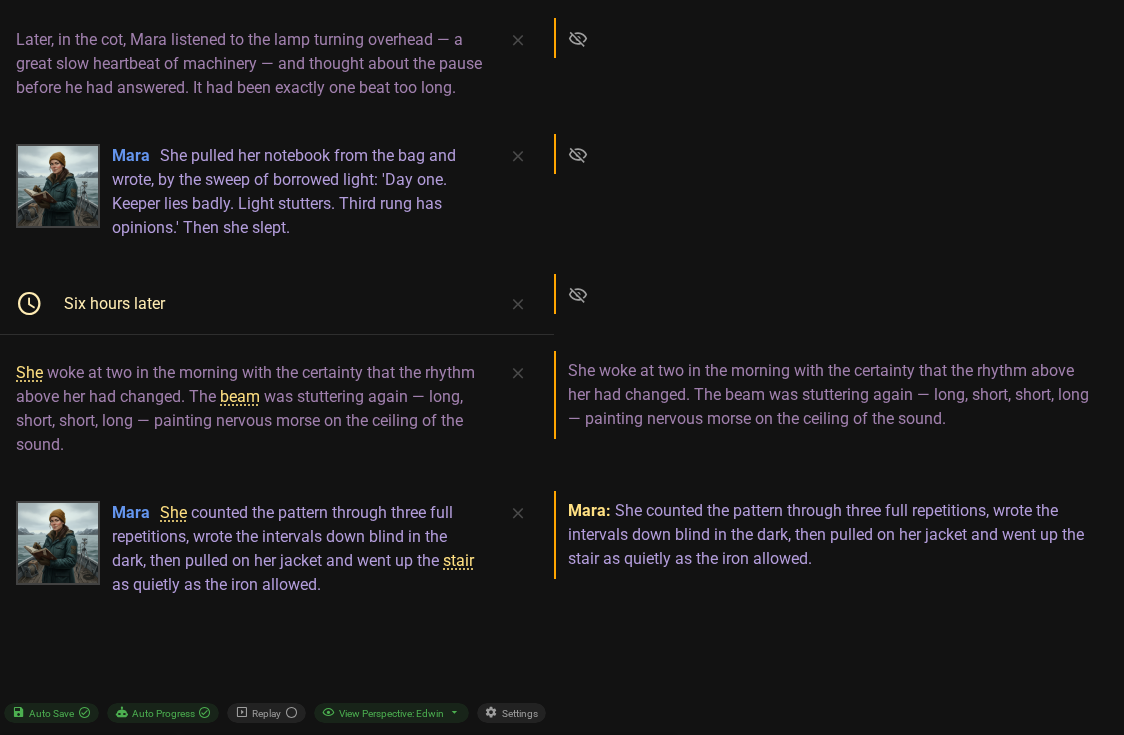
Say Mara writes in her notebook alone in her room. With View Perspective: Edwin the cell beside that message is empty, because Edwin was not there. An empty cell shows a small icon; hover it to read why it is empty: the character noticed nothing, the analysis did not run yet or failed, or the message is of a type that has no perspectives (a time passage or a director note, for example).
Double-click a perspective to change it. Press Enter to save, Shift+Enter for a new line, Escape to cancel. You can also double-click an empty cell to write a perspective yourself, as long as the message is one that characters can notice. Save an empty text to say that the character noticed nothing. Messages that have no perspectives cannot get one this way, and the introduction is read only here: every character who was present shares its text, and you change it in the Scene Editor.
Your text replaces only that one character's view of that one message, and it does not start an AI request. The Summarizer keeps your text when it analyzes the scene later. If you change the message itself, your text stays but is marked Out of sync; Analyze perceptions on that message, or Repair, analyzes it again and replaces your text.
Later perspectives and summaries can be built on the one you changed. They stay as they are. When there are any, a note below the cell tells you how many, with a Mark them out of sync button. Click it only if your change should flow into them: they are flagged as out of sync, and Repair makes one Summarizer request for each affected message.
A perspective that is out of sync shows its last text with an Out of sync chip. The story keeps using it until you choose Repair in the bar above the message input.
Related pages
- Knowledge: the Character perspectives mode, its cost and how characters learn things.
- Scene Header: the perspective label in the header.